How to use Claude Code with Terraform, without hitting a wall
Claude Code can read, write, and iterate on Terraform code faster than any human, but the platform running beneath it determines whether that speed translates into real productivity or a growing queue of waiting plan commands.
Claude Code has changed the shape of infrastructure work. It can read a Terraform repository, understand how modules fit together, generate valid HCL, run commands, and then revise its own output in a tight loop. For a DevOps engineer, that means less time writing repetitive infrastructure code by hand and more time reviewing intent, risk, and architecture.
The hard part of incorporating AI into your infrastructure workflow is not getting a model to write a resource block; it's building a process where the model can generate code, test it, inspect the result, and keep going without turning every step into another manual checkpoint.
To automate Terraform infrastructure writing with AI safely and effectively, you need to keep the loop tight, ground the model in the repository, and make every generated change pass through validation and plan output before anything gets applied.
This guide walks through the practical setup, real HCL examples, what changes when Claude Code becomes an agent instead of a helper, and the bottleneck that appears once the feedback loop starts working.
How to use Claude Code with Terraform
The simplest way to get value from Claude-coded Terraform work is to point Claude at a real repository and let it build context from the files you already trust.
In a typical repo, that means main.tf, providers.tf, variables.tf, outputs.tf, environment-specific .tfvars files, nested terraform modules, and whatever documentation explains naming conventions, AWS account boundaries, and deployment practices.
The first session should be boring. Install Claude Code, open a terminal in the infrastructure repository, authenticate with your account or export ANTHROPIC_API_KEY, then start the session inside the repo.
From there, start with repository-level questions instead of getting the AI to create anything immediately. Ask it to explain the module structure, identify provider aliases, summarize the current Terraform configuration, or trace which inputs flow into a specific module.
Claude Code reads the codebase before it answers, meaning it's usually better than pasting isolated snippets into a chat window. It has the context needed to follow local conventions, spot deprecated patterns, and work with the actual system instead of an abstract example.
Once Claude understands the repo, it's already ready for generation, review, and testing.
Using Claude AI to write IaC code with examples
Once Claude has read the repository, the next move is to give it work that is specific enough to constrain the output, but open enough that it can apply local conventions. That is where the Claude-Code-Terraform integration starts to feel like a game changer.
A basic example is adding a new AWS resource from a natural language request:
Add an S3 bucket for application uploads in this repo. Follow existing naming conventions, enable versioning, enable server-side encryption with AES256, add tags that match the rest of the project, and run terraform validate when you are done.
Claude will usually inspect the current provider setup, tag locals, and naming patterns before it writes anything. A representative result looks like this.
The next level up is refactoring Terraform modules rather than adding a single resource. For example, you might ask Claude to turn a single environment module into one that works cleanly across dev, staging, and prod:
Refactor this VPC module so it supports dev, staging, and prod without duplicating the resource definitions. Keep the current outputs stable if possible, and show me the before and after changes.
Before, the module might have hardcoded environment-specific values directly into resource names and CIDR selections. After, Claude usually introduces variables such as environment, maps for per environment settings, and outputs that preserve the current interface. That work is tedious for humans, but it's exactly the kind of repetitive consistency problem AI handles well when it has repo context.
The security use case is even more valuable because it combines code generation with review. Ask Claude to inspect the repo for a permissive rule and patch it:
Find any security group that allows ingress from0.0.0.0/0. Explain which one is risky, patch it to the narrowest reasonable source based on the rest of this repo, and runterraform validate.
In a good workflow, Claude does not just create code. It reads the existing infrastructure code, finds the offending resources, patches the specific rule, and validates the result before a human ever reviews the diff.
In the next step, Claude stops behaving like autocomplete and starts behaving like an agent.
Using a Claude code Terraform agent workflows to tighten the loop
Using Claude as a helper is useful. Using it as a Claude code Terraform agent is where the real productivity jump starts. The model is no longer waiting for you to translate every error message into the next prompt.
The pattern is straightforward. Claude generates HCL, runs terraform plan, reads the output, identifies missing variables or permission errors, adjusts the code, and tries again.
In AWS, IAM policy work is the clearest real-world example. Claude can attempt a deployment, read the failure, generate a narrower policy, and iterate until the system has the permissions it actually needs instead of the permissions somebody guessed on day one.
That process is also where safe usage matters most. A good agent loop still asks clarifying questions when the context is ambiguous. If a Lambda function needs an execution role, Claude should notice that and ask whether the workflow should include iam:CreateRole and iam:AttachRolePolicy or whether those are managed elsewhere.
That's not friction; it's the model exposing uncertainty before it touches production.
Infrastructure stops being something you only deploy and starts being something you can interrogate. You can ask Claude to
- Audit for best practices
- Trace dependencies before a change
- Suggest cost optimization opportunities
- Answer operational questions about what services exist in the current system
Auditing your Terraform infrastructure with Claude Code
After code generation and agent loops, one of the most underrated use cases is auditing and analysis. Claude Code is good at writing HCL, but it's often even more useful at reading a large Terraform repository and turning it into answers a human can act on.
That can be as simple as asking for visibility into public exposure:
Find all resources in this repository that are likely to have a public IP address.
It can also be a targeted security review:
Identify every security group that allows ingress from any IP and summarize the intended purpose of each one.
Or it can be an architecture question that would normally require a long manual trace through modules, variables, and outputs:
Explain what the payments module provisions, which AWS services it depends on, and what other modules depend on it.
This is a safer place to begin with AI than autonomous apply workflows because the blast radius is lower and the feedback is immediate.
Start "read only" and let Claude build context. Ask it to surface potential issues and review the reasoning before you let it make edits.
Why Terraform slows down your Claude Code workflow
When Claude Code and Terraform are working well together, the mismatch is hard to miss. The model writes code in seconds, but plan and apply still queue behind a backend designed for humans who are making occasional changes, not agents generating and testing changes continuously.
That gap is not theoretical. AI-generated changes occur in seconds while a standard backend can take minutes to catch up. It's at this point that the feedback loop breaks, because the agent spends most of its cycle waiting rather than iterating.
That wait comes from four design choices that made sense in an earlier era. The state file is globally locked, so one plan can block unrelated work.
Operations refresh the full state even when the change touches a tiny part of the graph. Execution stays mostly sequential, so multiple agents or team members line up instead of running in parallel. And the underlying data is flat JSON, which means the agent cannot simply query live infrastructure management state to answer questions about resources, dependencies, or drift.
Terraform is not broken. It's just optimized for a different operating speed. Once the feedback loop depends on fast iteration, the backend becomes the limit.
How Stategraph closes the feedback loop
Stategraph is a drop-in replacement for the Terraform state backend, so the surface area of change is small even though the architectural change underneath is large.
You keep your current modules and providers, migrate your existing state into Stategraph, and then run plan, apply, and query through the Stategraph CLI. The migration path is intentionally small, but the exact command sequence is better linked to the docs than hard-coded here.
What changes underneath is that the state is stored as a dependency graph in PostgreSQL instead of a flat JSON blob.
A plan touching 12 out of 2,847 resources can evaluate those 12 instead of scanning the full graph. Locking happens at the resource level instead of across the whole state. Stategraph can also plan and apply across multiple states as one atomic transaction, so a change that spans networking, compute, and storage does not need to be orchestrated as a sequence of separate plans and applies.
Remember when we said AI-generated changes occur in seconds and Terraform can't keep up? Stategraph can.
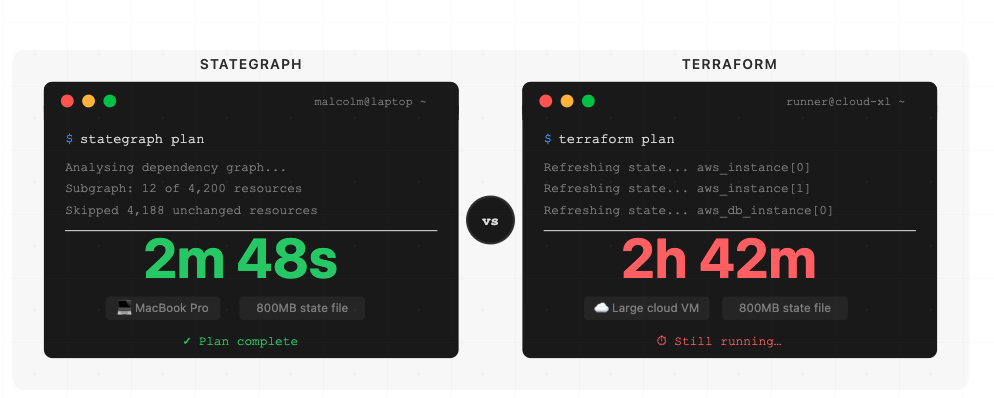
Stategraph works with AI because of what we've built to help power the connection: A Claude Code skill can teach the agent how to work with Stategraph's CLI and queryable state.
Claude doesn't magically know every command, but Stategraph gives AI workflows a faster backend, a queryable model of infrastructure state, and safer ways to inspect impact before acting. Here are some commands the agent can run:
stategraph query "SELECT * FROM resources WHERE type = 'aws_s3_bucket'"for SQL queries across infrastructure statestategraph blast-radius "aws_vpc.main" --state IDfor impact analysis before changesstategraph gaps --provider awsto find unmanaged cloud resourcesstategraph states summary --state IDfor instant infrastructure overviewstategraph plan/stategraph applyare drop-in replacements forterraform plan/terraform apply
Stategraph's CLI is being shaped to work well with agents, with commands that help orient the model quickly, outputs that are easier to parse programmatically, and error messages that guide the next step instead of leaving the agent stuck.
Claude can query live infrastructure state directly, inspect blast radius before a risky change, and support gap analysis that compares declared state with what actually exists in the cloud.
At the workflow layer, Stategraph can also run Terraform through pull-request-based orchestration with dependency-aware execution, policy enforcement, and drift detection, giving AI-generated changes a safer path through review before they land.
For AI workflows, that's the difference between a stalled loop and a working one: The agent writes code, validates it, plans only the affected subgraph, checks what else depends on the target resource, and keeps iterating without spending most of its life blocked by infrastructure plumbing. As a result, plan and apply are dramatically faster thanks to the database architecture.
Conclusion
Stategraph enables you to get the most out of AI tools with Terraform safely, by tightening the loop and making each step auditable.
Claude Code and Terraform are already a powerful combination for writing, reviewing, and deploying cloud infrastructure. The place where the workflow stalls is the backend. Stategraph closes that gap with PostgreSQL-backed state, resource-level locking, SQL-queryable infrastructure state, audit-ready change history, and a Terraform-compatible CLI.
Book a Stategraph demo to learn how we can unlock your Claude Code plus Terraform workflow.
Claude Code for Terraform FAQs
What is a Claude Code skill file, and how does it work with Terraform?
A skill file is a SKILL.md document that teaches Claude a repeatable workflow. For Terraform, that usually means telling Claude how to inspect modules, what commands to run, what safety checks to perform, and how to present diffs and plan output.
Should I use an MCP server or a skills file to connect Claude Code to my Terraform workflow?
Use a skill first when the job is guiding Claude's behavior inside a Terraform repository. Use MCP when Claude needs to reach outside the repo into other systems such as issue trackers, cloud APIs, or internal services.
How do I install the Stategraph skill for Claude Code?
Stategraph ships five skills from github.com/stategraph/skills: a top-level stategraph router that dispatches to stategraph-query, stategraph-change, stategraph-import, and stategraph-refactor. Most users only need the router, since it picks the right workflow for whatever you ask.
The fastest install is the skills CLI:
Or install a specific skill with npx skills add stategraph/skills -s stategraph-query.
For a manual Claude Code install, clone into ~/.claude/skills/ so each skill lands at ~/.claude/skills/<name>/SKILL.md:
You also need the Stategraph CLI on your PATH and a configured tenant (stategraph info should succeed). Full instructions live in the AI Agents docs.
Does Claude Code support Terraform MCP servers?
Yes. Claude Code supports MCP servers broadly, so a Terraform-related MCP server can be connected if it follows MCP conventions and you trust the server you are installing.
How many MCP tools can Claude Code handle before performance degrades?
There's no single hard cutoff. Anthropic's guidance is that context can degrade as connected tools grow, which is why Claude Code now defers tool definitions with MCP tool search and warns when tool output gets too large. In other words, performance depends more on tool description size, output size, and workflow design than on one magic number.