Blast Radius in Terraform: What it is and how to reduce it
When a Terraform change goes wrong, the blast radius determines how much of your infrastructure goes with it. Understanding and deliberately shrinking that blast radius is one of the highest-leverage things a platform or infrastructure team can do.
A mis-scoped Terraform run can cascade across dozens of unrelated resources when the blast radius is too large. That problem usually doesn't show up on day one. It shows up later, when one Terraform project has grown into hundreds of resources, shared modules are wired into multiple services, and a routine terraform apply now carries production risk that feels far out of proportion to the code diff.
Most teams hit this at scale. One terraform.tfstate becomes a terralith, root modules start doing too much, and the gap between what a plan appears to touch and what it can actually influence gets wider over time.
This article covers what Terraform's blast radius means, why it grows, how to visualize and measure it, and the concrete patterns that keep it small enough to manage.
What is blast radius in Terraform?
Terraform's blast radius is the full set of resources a change could create, modify, or destroy if that change behaves unexpectedly, is applied in the wrong place, or simply turns out to be broader than the author intended.
In practice, that includes direct targets in the plan, but it also includes dependent resources with behavior that is shaped by the change through Terraform dependency graphs and provider operations.
Terraform builds a dependency graph from configuration, state, explicit dependencies, and interpolations, then uses that graph to plan and execute changes in the correct order.
Blast radius isn't only about obvious mistakes. Deliberate module changes by Terraform users can still have a large blast radius if they affect multiple resources across different environments and take a long time to reverse.
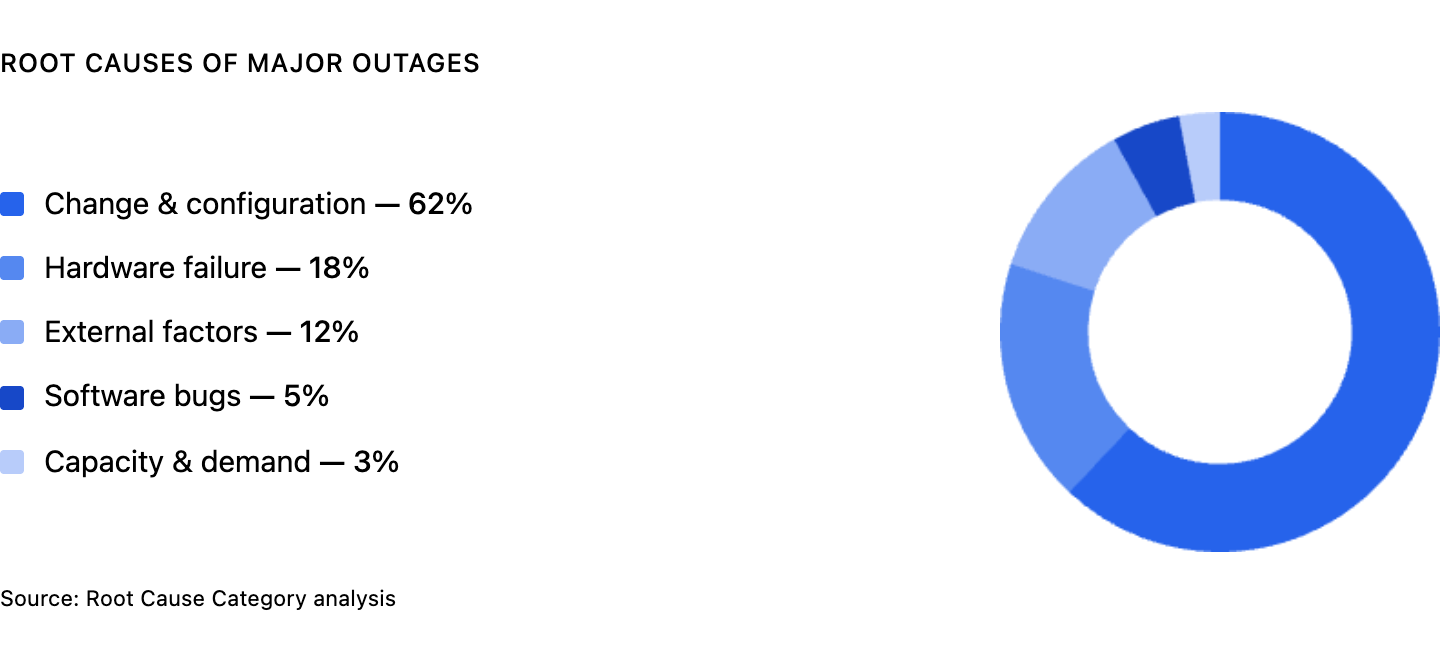
The smaller the blast radius, the shorter the recovery path, the easier the rollback, and the easier it is to understand the current state before you touch production. According to the Uptime Institute 2025 Global Data Center Survey, the leading causes of outages are change and configuration issues, so it always makes sense to reduce the scope of infrastructure work.
Once you define blast radius, the next question is obvious: Why does it keep getting bigger, even when teams know better?
Why blast radius grows
The reason blast radius expands is rarely one bad decision. It's usually the result of a Terraform project that kept accreting responsibility until the boundaries stopped being clear.
Here are some of the most common reasons blast radius grows.
Monolithic state files are the most common cause. When one terraform.tfstate tracks networking, databases, compute resources, IAM, and application services for an entire environment, almost every terraform plan has the potential to touch more than the author expects.
Terraform uses state to map configuration to real objects, and the broader that state becomes, the more a single run starts to look like a terralith instead of a focused unit of infrastructure management.
Tightly coupled modules make that worse. A shared module that exposes too much, accepts giant objects as input, or gets reused across multiple root modules without hard boundaries turns one module change into many downstream changes.
Because Terraform infers dependencies from references in configuration, loose module design quietly creates wide, implicit coupling that only becomes visible when plan output gets noisy or unexpected changes appear.
Overly broad IAM and provider permissions widen the possible impact again. Terraform can only act where its credentials permit it to act, so credentials scoped to an entire cloud account create a much larger potential blast radius than credentials scoped to one domain of resources.
Even a correctly scoped configuration is less forgiving when the execution identity has broad access across other resources and environments. Terraform can't verify that the credentials used at apply time are scoped the same way as the credentials used when the plan was created, so overly broad access makes a bad change harder to contain.
Long-lived plan-to-apply gaps are the last quiet amplifier.
The longer the gap between terraform plan and terraform apply, the more likely that drift or concurrent infrastructure changes will make the final result differ from what reviewers originally saw, which is why stale review cycles are risky in busy environments. The longer the gap between review and terraform apply, the more drift, concurrent work, and unintended consequences can leak into what looked like a contained plan.
Terraform blast radius visualization tools
Blast radius terraform visualization turns an abstract plan into dependency mapping you can actually inspect. Terraform's terraform graph command generates a visual representation of a configuration or execution plan in DOT format, and both -type=plan and -plan=tfplan can render graphs from planned changes.
In other words, you can generate a graph from the exact plan you intend to review, not just from the raw configuration files.
A practical starting point looks like this:
The rendered dependency graph won't tell you whether the change is good, but it will show which resources depend on which other resources, which is the first step in assessing the potential blast radius.
Here's an example blast radius graph, where modifying aws_security_group.api puts five downstream resources in scope.
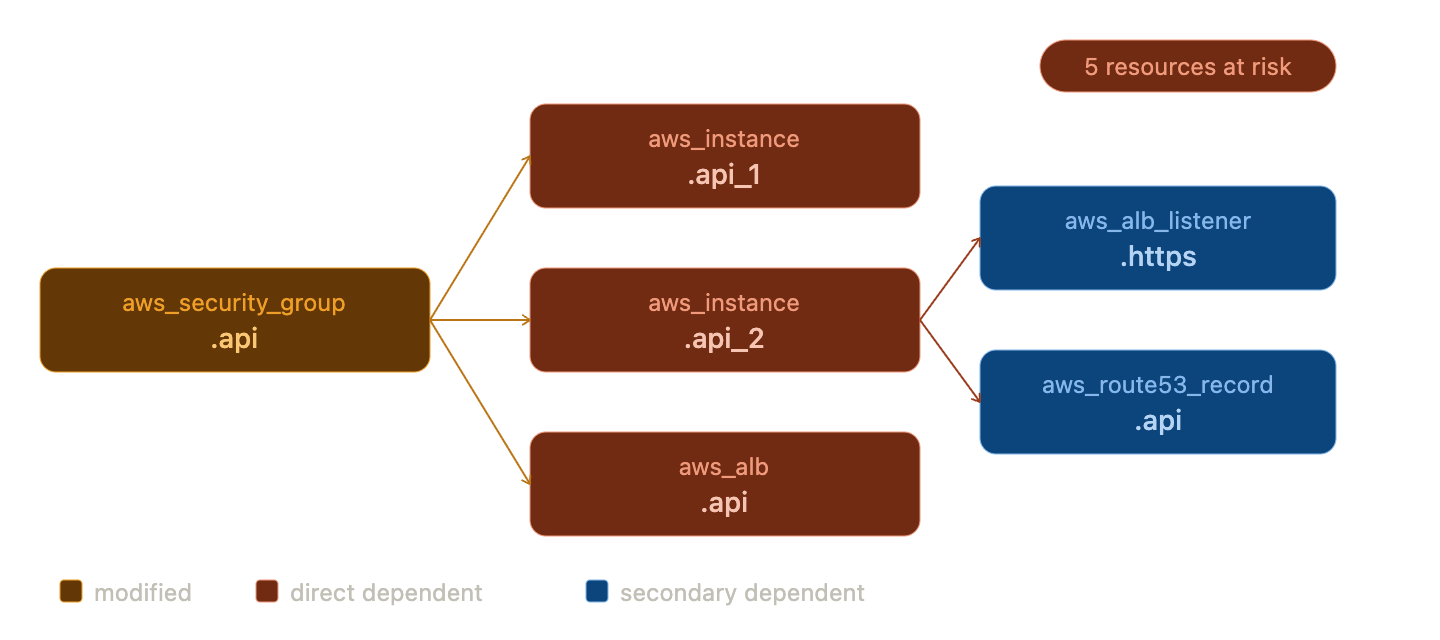
If a security group, subnet, or module output sits near the center of a dense dependency graph, you can see immediately that changing it may ripple across multiple resources.
If you want something more interactive, the open-source Blast Radius tool is purpose-built for this. Blast Radius is a tool for reasoning about Terraform dependency graphs through interactive visualizations, and the quickstart is straightforward. Install blastradius with pip3, install Graphviz, then run blast-radius --serve /path/to/terraform-project and open the local server in your browser. From there, you can highlight a resource and inspect its dependencies and dependents in a color-coded HTML view.
That's the practical point of visualization. It shows relationships, not just raw plan lines. During code review, that matters more than at apply time, because once reviewers can see which databases, virtual machines, network paths, and other services sit downstream of a proposed change, they can catch potential issues before they become operations work.
How to reduce blast radius in Terraform
Visualization helps you understand the problem. Reducing blast radius means changing the structure that created it.
Split your state
Separate Terraform state files by environment and by domain so resources that change together live together, and resources that change at different cadences do not.
Terraform supports remote state outputs through the terraform_remote_state data source, which gives you a read path across boundaries without forcing unrelated resources back into shared state. Keep networking, data, and application concerns in different state files whenever their lifecycle is different.
Use targeted workspaces
Terraform workspaces are separate instances of state data inside the same working directory, making them useful for isolating non-overlapping resources across different environments. They help at the environment layer, but you should consider alternative approaches for complex deployments that need separate credentials and access controls.
Don't treat workspaces as a substitute for proper module decomposition. Use them to keep dev, staging, and production distinct, not to hide monolithic modules.
Scope module inputs and outputs tightly
A module that accepts only the variables it needs and exposes only the outputs its callers actually use is easier to reason about and easier to change safely.
The more a module passes through giant objects, provider configuration, or loosely scoped data sources, the more implicit dependencies it creates. Tight interfaces make root modules smaller, dependency graphs cleaner, and module changes easier to assess before they land.
Apply least-privilege credentials
Terraform should run with credentials scoped to the resources it manages, not with blanket administrator access.
- In AWS, that usually means tighter IAM policies
- In GCP, tighter IAM role bindings
- In Azure, tighter RBAC scopes.
Least-privilege credentials do not fix bad Terraform configuration, but they do cap the damage, because a bad plan can't mutate infrastructure that the execution identity is not allowed to touch.
Use -target carefully
Targeting can be useful when you're troubleshooting or recovering from state problems, but targeting individual resources should not be part of your normal workflow.
Used routinely, -target can train teams to work around bad structure instead of fixing it, leaving Terraform state and configuration relationships harder to trust over time.
Try Stategraph
Stategraph doesn't remove the need for good Terraform structure, but it does reduce blast radius risk by making impact visible before apply.
Stategraph Insights provides blast radius analysis and dependency graph visualization, showing what a change will affect before you apply it. On top of that, Orchestration brings pull-request plans, policy enforcement, and drift detection into the review loop, which helps teams catch unexpected changes before they reach production environments.
Blast Radius in CI/CD Pipelines
Once these patterns are in place, the highest-risk place to ignore them is CI/CD. In automated pipelines, blast radius problems compound because the same speed that makes CI/CD useful also makes it easy to apply broad infrastructure changes before anyone has really understood the scope.
In production, there should be a human approval step between terraform plan and terraform apply, especially when a change touches sensitive resources or spans multiple services.
This step is especially important in production environments, where the plan output should surface an obvious blast radius count showing how many resources will be created, changed, or destroyed, along with any other signals that help reviewers assess scope quickly.
Mature teams often go further and turn scope into policy. A small plan might flow through GitHub Actions automatically, while a larger one gets routed to manual review if it crosses a threshold for multiple resources, destructive actions, or sensitive domains such as IAM and databases.
Stategraph fits naturally here because Orchestration runs Terraform in pull requests with dependency-aware execution, drift detection, policy enforcement, and approval requirements, while Insights adds blast radius analysis so reviewers can see what else a proposed change could affect before they approve it.
Conclusion
Blast radius isn't a fixed property of a codebase. It's something teams either design down over time or allow to expand until every routine change feels dangerous.
The levers are straightforward, even if the work is not. Split state along real operational boundaries, keep Terraform modules tightly scoped, put hard limits on credentials, and use visualization so dependency graphs are visible during review instead of after an incident.
If you want continuous visibility into how changes in your Terraform configuration ripple across your infrastructure, why not get started with Stategraph?