How to migrate from Terraform to OpenTofu
In August 2023, HashiCorp changed Terraform’s licensing from an open-source model to a restrictive Business Source License (BUSL). This action created uncertainty for users, especially organizations, as the new license introduced potential legal and operational risks. Companies suddenly had to worry about whether their use of Terraform would be considered "competitive" under HashiCorp’s terms. Additionally, there was a risk that HashiCorp could change the license terms in stricter ways through any future updates. This simply left the organization unsure about how secure or reliable Terraform would be for long-term use.
To solve this issue, OpenTofu was created as a direct fork of Terraform, maintaining its open-source nature. Supported by the Linux Foundation, it offers a more reliable, transparent, and vendor-free solution to the IaC market. OpenTofu is backed by supporters like Terrateam, Spacelift, and env0, who contribute to the project’s development. With OpenTofu, you can manage your infrastructure without worrying about any sudden changes to licensing, allowing you to focus on development instead of legal concerns.
Let’s take a closer look at why OpenTofu might be a great choice for your infrastructure management:
- Open Source: First and foremost, OpenTofu is open-source. This is the key reason many developers and organizations are making the switch. OpenTofu keeps everything transparent and flexible, unlike Terraform, which recently moved to a restrictive Business Source License (BUSL). This means you won’t have to worry about sudden licensing changes or unexpected restrictions. With OpenTofu, you stay in control of your infrastructure, knowing the platform will always remain open, accessible, and under the full control of the community.
- Avoid Vendor Lock-in: Another important benefit of OpenTofu is the freedom from vendor lock-in. With Terraform's shift to the Business Source License, there was a growing concern about relying on HashiCorp’s future decisions, which could introduce more restrictions or any unexpected changes. OpenTofu eliminates that uncertainty. Since it’s fully open-source and community-driven, you’re not tied to a single vendor’s future updates or licensing terms. You can manage your infrastructure confidently, knowing that OpenTofu is controlled by the community, not a corporation. This ensures that your infrastructure management remains flexible and free from vendor-imposed limitations.
- Compatibility and Familiarity with Terraform: Next, let’s discuss why OpenTofu is so easy to use or migrate to, especially if you’re already familiar with Terraform. OpenTofu works well with Terraform, so if you’ve already been using Terraform, you can continue using your existing Terraform configurations easily. This makes the transition to OpenTofu much simpler and requires minimal effort from your end, so you won’t need to invest a lot of time learning new tools or rewriting the code. It’s an easy switch for teams who are already comfortable working with Terraform.
- Community-Oriented Development: OpenTofu is backed by a growing community of developers and supported by the Linux Foundation. This ensures that OpenTofu is constantly improved with regular feature updates and security patches. The needs of the community shape the development process of OpenTofu, keeping it reliable and aligned with what users actually need within their IaC tool. The active involvement of the community ensures that OpenTofu remains a stable and dependable choice for managing infrastructure.
What are the Differences and Similarities Between Terraform and OpenTofu?
OpenTofu was created as a fork of Terraform to provide an open-source alternative without the risks associated with restrictive licensing. While both tools share a common foundation, it's important to understand where they differ first. These differences define why many users are moving to OpenTofu and how it addresses gaps left by Terraform.
- Licensing: The most significant difference between Terraform and OpenTofu is their licensing. In August 2023, HashiCorp changed Terraform's license from an open-source model to a Business Source License (BUSL). This new license introduced restrictions that could affect organizations using Terraform. Specifically, it limited the ways Terraform could be used by organizations that may compete with HashiCorp's commercial offerings. As a result, organizations had to consider whether their use of Terraform might violate these new terms. OpenTofu, on the other hand, stays fully open-source. It is licensed under a widely accepted open-source license, making sure that the users can continue to rely on it without worrying about unexpected changes to licensing. This guarantees that OpenTofu remains free from vendor restrictions and ensures more stability and transparency for anyone using it for their infrastructure management.
- Community Support: OpenTofu is built by its users and supported by the Linux Foundation. Every update comes from feedback, making the tool better for real-world needs. For example, OpenTofu version 1.7 introduced native encryption for state and plans, making infrastructure management more secure. Version 1.8 made things more flexible by allowing variables and locals in module sources and backend configurations. In version 1.9, which is currently in beta, OpenTofu introduces useful features like
for_eachin provider configuration blocks, allowing better resource customization. Additionally, it includes anexcludeoption for planning, giving users more control by letting them skip specific resources during plan execution. These updates make your infrastructure management more flexible and specific to user needs. - Independence: OpenTofu ensures that users are not tied to any single company. Since it’s open-source and community-driven, there’s no risk of being forced into using certain features or paying for services. This means you have full control over your infrastructure, and you’re free to make changes without being restricted by a vendor’s future decisions. On the other hand, Terraform is controlled by HashiCorp, and future changes to the tool depend solely on their decisions. If HashiCorp decides to limit or charge for certain features, users will have to adapt to those changes. This introduces the risk of "vendor lock-in," where businesses might be stuck using certain tools or features they don’t want because they are tied to Terraform’s updates.
Even though OpenTofu and Terraform differ in several ways, they share many key features that make switching between them easy:
- Syntax and Configuration: Both OpenTofu and Terraform use the same configuration language, HCL (HashiCorp Configuration Language). This ensures that your existing Terraform configurations work directly with OpenTofu without any need for major changes. This similarity makes it a smooth transition for users who are already familiar with Terraform.
- Core Functionality: OpenTofu keeps the same IaC principles that Terraform uses. This means you can continue to define, provision, and manage your infrastructure using code. The transition is easy, so if you're already using Terraform, switching to OpenTofu won't be a difficult task. You can keep working the same way without having to learn a whole new approach.
- Provider Ecosystem: OpenTofu is compatible with the same providers used by Terraform. This means you can continue using the same tools and services, like cloud platforms and integrations, without worrying about compatibility. The transition is simple, and you won’t lose access to any of the services you depend on, which will make it easier to switch without trouble.
These similarities make OpenTofu an ideal option for teams already using Terraform. It offers the same features and functionality but with a stronger focus on open-source values and community-driven development.
OpenTofu Setup
Now that we’ve covered the differences and similarities between OpenTofu and Terraform let’s move on to setting up OpenTofu. In this section, we’ll go through the installation process for different operating systems and point out some important things to keep in mind when using OpenTofu.
Firstly, to get started with OpenTofu, you can install it from the official website. OpenTofu is available for all major operating systems, including macOS, Linux, and Windows. You can find the detailed instructions for each operating system from here.
Once you’ve installed OpenTofu, you can confirm the installation by running the following command in your terminal or command prompt:
tofu version
This will display the installed version of OpenTofu and confirm that the installation was successful.

While OpenTofu is compatible with most Terraform features, there are some differences to note. Specifically, certain functions and S3 backends are version-dependent and may not be supported in OpenTofu. Functions like encode_tfvars, decode_tfvars, and encode_expr are examples of this, and their availability can vary between OpenTofu versions.
For the most accurate and up-to-date information on what is supported, refer to the official OpenTofu documentation here. This will give you the latest updates on feature support and any changes that might affect your setup.
Hands-On: Migrating from Terraform to OpenTofu
Let's suppose you already have a set of Terraform resources, and now you want to migrate to OpenTofu. Here’s how you can migrate your setup step-by-step.
For this example, let's say you have an AWS VPC and an IAM role, with the state stored in an S3 bucket. While using a remote backend isn't mandatory, it’s always a good idea to store your state remotely for better management.
But before migrating to OpenTofu, make sure that your Terraform configuration is working correctly. You can check this by running the terraform state list command to list the current state.

This will display all the resources Terraform manages, allowing you to verify that your setup is working correctly.
Now, download the Terraform state file from your S3 bucket to your local directory. You can use this command:
aws s3 cp s3://state-migration-bucket/opentofu/terraform.tfstate ./terraform.tfstate
After you've downloaded the state file, open it and look for the provider section. It should look something like this:
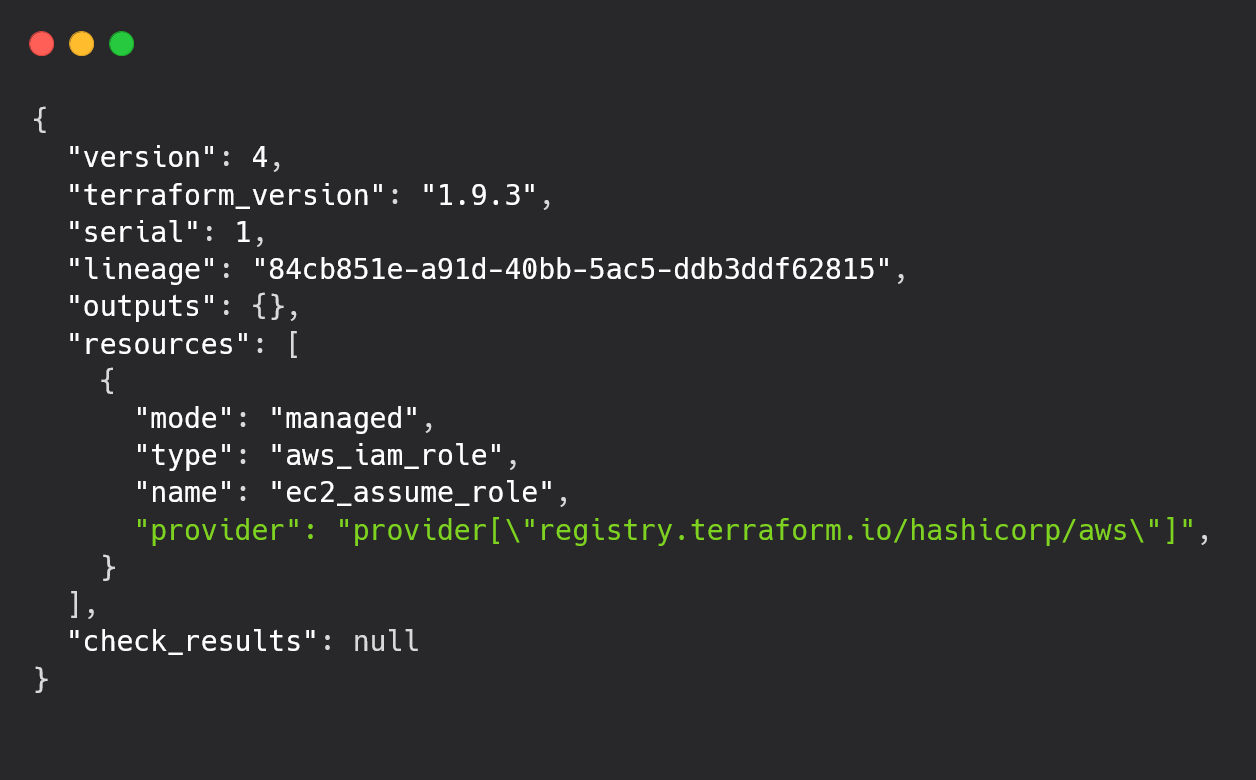
This shows that your resources are currently being managed using Terraform. It tells you that Terraform is handling the provider, which, in this case, is AWS.
Next, initialize your OpenTofu setup by running the following command:
tofu init
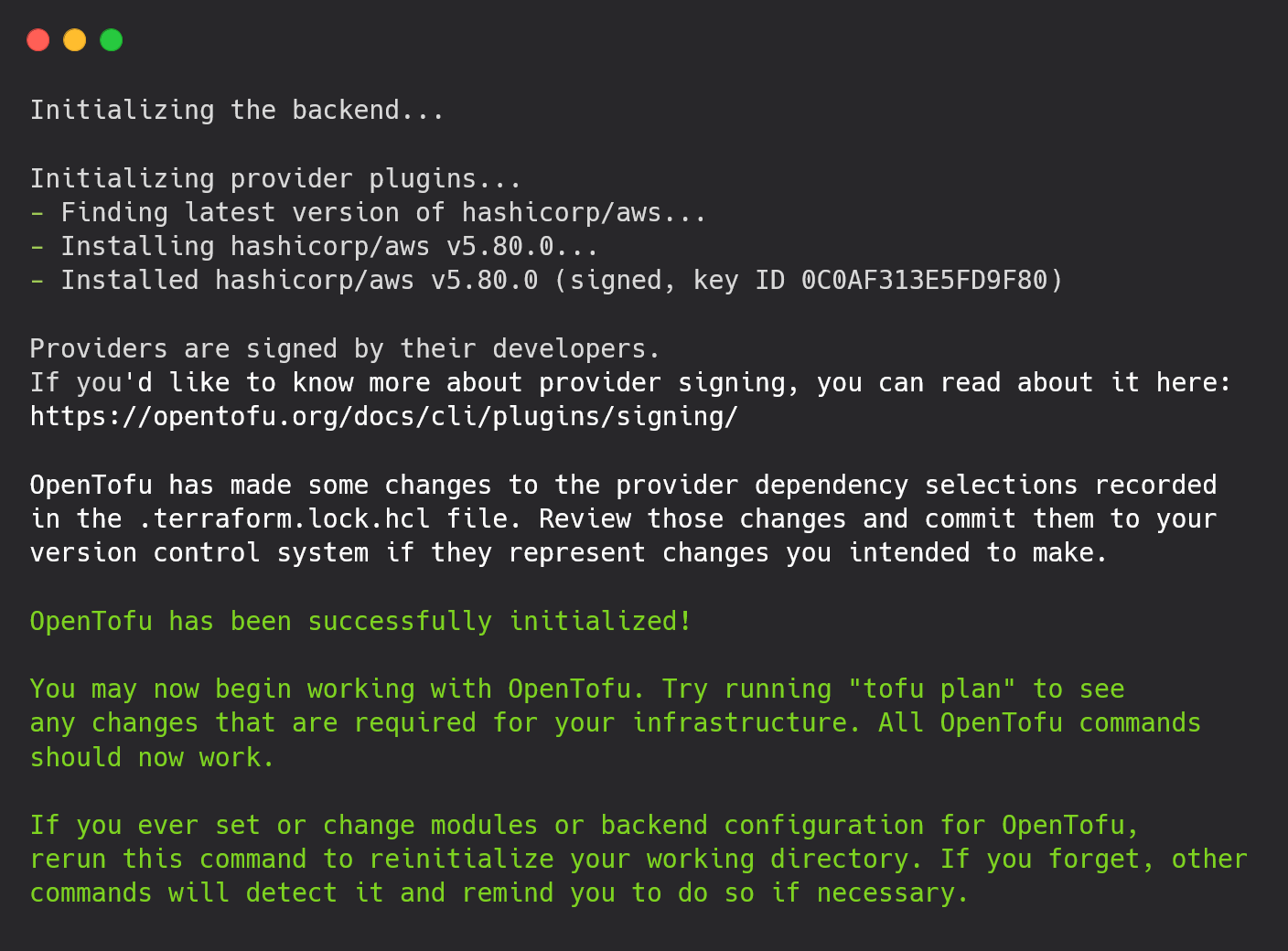
During this step, OpenTofu will install the necessary provider plugins (e.g., AWS in this case) and create the .terraform.lock.hcl file. You can now use the tofu state list command to check the resources in your state file, which is similar to how you would use the terraform state list.

Finally, you can run tofu plan and tofu apply to make sure that everything is working fine. If no changes are needed, you will see a message like this:
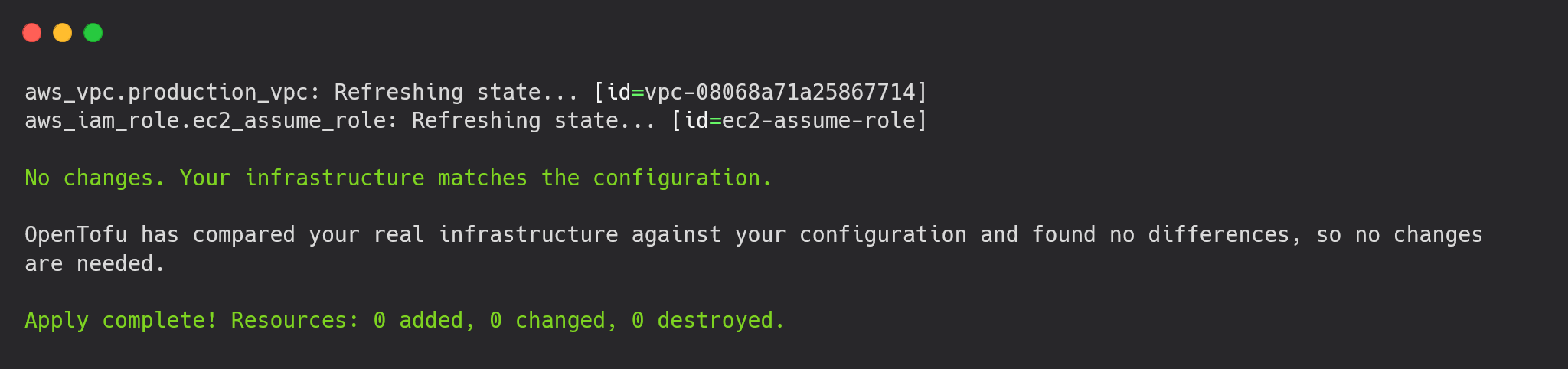
Now, to confirm that the state file reflects the new provider configuration under OpenTofu's management.
To do this, you can copy the updated remote state file back to your system using
aws s3 cp s3://state-migration-bucket/opentofu/terraform.tfstate ./opentofu.tfstate
Once the state file is copied, open the file and check the provider section. Previously, it would have shown that Terraform was managing the AWS provider. After applying the OpenTofu configuration, the state file should now show that OpenTofu is the managing tool, and the provider section will likely be updated to reflect OpenTofu as the management tool rather than Terraform.
Here is an example of what the provider section might look like after the migration:
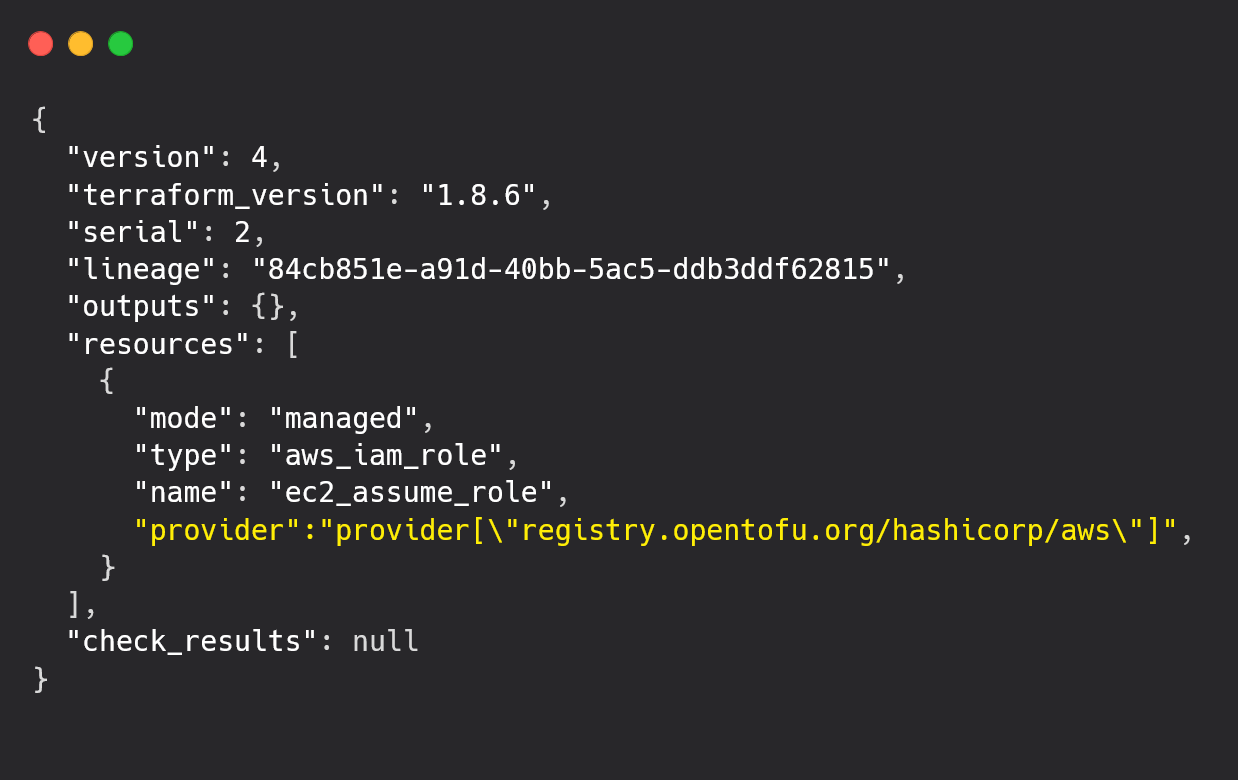
This change simply shows that OpenTofu is now handling your infrastructure instead of Terraform. The important point is that the configuration and setup remain the same, but the management tool has switched to OpenTofu.
If there are no issues or errors when copying and inspecting the state file, it means that OpenTofu has successfully taken over the management of your infrastructure.
After migrating from Terraform to OpenTofu, the migration process becomes even easier with Terrateam. While the migration itself was pretty simple, Terrateam simplifies this migration process even further.
OpenTofu with Terrateam
Terrateam is a tool designed to work with both Terraform and OpenTofu in GitOps CI/CD pipelines. It helps teams automate their infrastructure management, making it even faster. With Terrateam, you can easily manage your IaC, collaborate with other team members, and automate your deployments.
You only need to integrate Terrateam into your GitHub repository, and it will automatically provide a plan for your infrastructure changes. You can then comment terrateam apply on a GitHub pull request to apply the configuration. Since this process happens within a GitHub PR, all team members can review, suggest changes, and approve the deployment. This workflow makes your organization’s infrastructure management easy and ensures that everyone on the team is involved in making decisions, improving both speed and accuracy at the same time.
To start with Terrateam, you’ll need to install Terrateam app on your GitHub. Follow the steps in the documentation, and your GitHub will be connected to Terrateam in no time.
Now, to switch from Terraform to OpenTofu with Terrateam, you don’t need to do much. In your config.yml file, simply add the line that tells Terrateam to use OpenTofu as the engine:
engine:
  name: tofu
  version: 1.6.2
Alternatively, if you want to apply OpenTofu to specific workflows, you can add this code snippet in your config.yml:
workflows:
  - tag_query: prod
    engine:
      name: tofu
      version: 1.6.2
Once you've made these changes, Terrateam will automatically provide a plan for your infrastructure configuration. You can then review the plan to make sure that it meets your requirements.
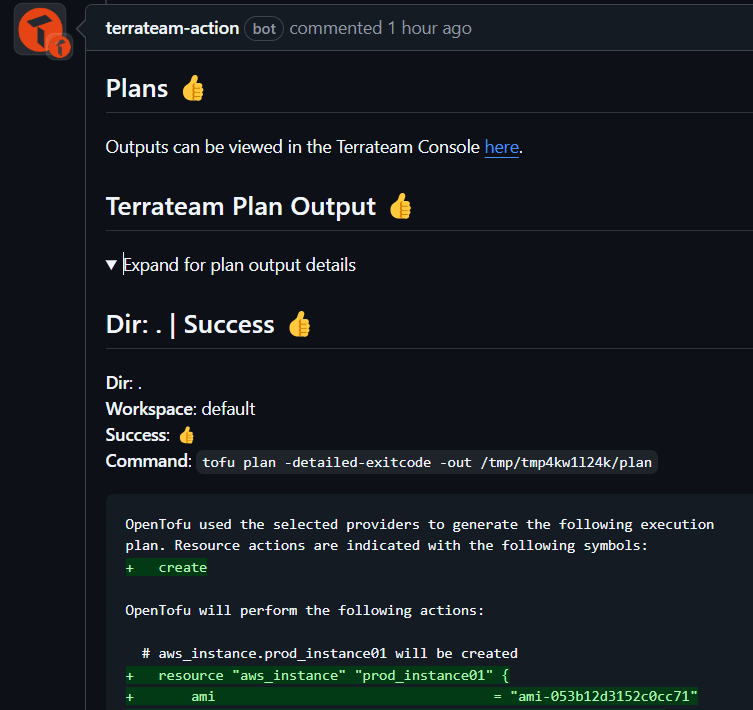
If everything looks good, simply comment terrateam apply on the pull request to apply the changes.
By this, you’ve completed the deployment, and the migration to OpenTofu is done! By simply adding three lines to your config.yml file, you've successfully switched to OpenTofu.
Terrateam also offers additional features like RBAC, centralized configuration management, and more.
Conclusion
In this blog, we discussed why switching to OpenTofu is a good choice, highlighting its open-source and flexible nature without vendor restrictions. We compared Terraform and OpenTofu, highlighting the key similarities and differences, and provided a simple guide to help you migrate your existing Terraform setup to OpenTofu.