Terraform Cloud Alternatives: Finding the Right IaC Platform for Your Team
Managing infrastructure with IaC tools like Terraform or Pulumi becomes more complex as the infrastructure scales. You need to make sure that everything from databases to networks works fine and is safe from security risks without incurring unexpected billing costs. With larger infrastructure, tracking changes, enforcing security rules, and preventing misconfigurations become more difficult, especially with the infrastructure drift that creates inconsistencies between the actual state and the desired configuration. By selecting the right IaC platform, you can overcome these challenges easily, making sure that you are able to control your infrastructure’s costs, and keep it more secure.
In this blog, we’ll explore Terraform Cloud, its benefits, limitations, and pricing. Additionally, we’ll discuss how to choose the right IaC tools that best fit your team’s needs. By the end, you’ll have a clearer understanding of Terraform Cloud and how to select the most suitable IaC platform for your infrastructure.
What is Terraform Cloud?
Terraform Cloud, developed by HashiCorp, is a platform that helps DevOps or Infrastructure teams using the Terraform IaC tool manage their infrastructure provisioning, compliance, and resource management across multiple cloud providers, such as AWS, GCP or Azure. It provides a centralized way to make sure that any changes within your infrastructure are applied consistently, which allows all the team members to collaborate on the updated Terraform configuration.
The TFC platform reduces the risks of misconfigurations. It ensures smooth infrastructure management by tracking all changes and automating deployments across public cloud platforms like AWS, Azure, or on-premise data centers. It is commonly used by mid to large enterprises and teams that manage complex infrastructure setups. Its key features, such as remote state management and role-based access control (RBAC), make it much easier for multiple teams to collaborate while ensuring that infrastructure updates are secure across the organization.
However, Terraform Cloud’s pricing might be a financial overhead for early-stage startups or smaller teams growing rapidly. These teams often look for other alternatives that offer similar features or more at a lower cost, making it easier to manage and monitor infrastructure without increasing the operational budget.
Terraform Cloud benefits
In this section, we’ll focus on some of the key benefits of Terraform Cloud for managing your infrastructure more effectively, especially for teams who are working with multi-cloud environments.
- Collaboration features for teams: Terraform Cloud enables multiple engineers to collaborate on the same infrastructure simultaneously while maintaining consistency within your organization. The workspaces feature in TFC helps you manage different environments, such as development, staging, and production, making sure that each environment is organized separately. Meanwhile, projects allow you to group multiple workspaces under a single structure, making it easier to manage related infrastructure across different environments.
- Policies for infrastructure changes: Terraform Cloud offers policy enforcement tools, such as Sentinel, and supports policies, such as RBAC and OPA, that allow teams to control how infrastructure changes are made, ensuring that compliance standards are met and security risky changes are avoided. These tools are particularly valuable in environments where strict governance is required. For example, if your organization requires that no changes be made to production environments without any prior approval, Terraform Cloud allows you to enforce this rule through tools like Sentinel or other policy-as-code solutions. This ensures only approved changes are deployed to production, preventing unauthorized or potentially risky updates.
- Remote state management and versioning: Terraform Cloud offers remote state management, storing your infrastructure's state files centrally. This allows teams to collaborate without any conflicts, as the state file is locked during updates to prevent changes simultaneously. Once the update is done, the state is synced and unlocked, making sure that everyone has access to the latest version of the state file. Additionally, Terraform Cloud tracks changes through state versioning, enabling teams to review and roll back to previous versions if needed. This simplifies troubleshooting and ensures the stability of your infrastructure during updates.
- Private Registry: Terraform Cloud provides a private registry that allows teams to manage, share, and reuse Terraform modules within their organization. By using a private registry, you can create a centralized catalog of modules that meet your organization’s standards. Additionally, the private registry offers version control for modules, making it much easier to track updates and make sure that the correct version is being used in each environment.
Terraform Cloud limitations
While Terraform Cloud provides valuable infrastructure management features, it has some limitations. Let’s take a closer look at a few key challenges teams may face while working with Terraform Cloud:
- Higher pricing for smaller teams: Although the free tier covers up to 500 resources, teams looking to scale quickly might refrain from using this as the Standard plan charges per resource per hour as soon as the limit is exhausted. This will be an unwanted cost for early-stage startups or small teams as they might have unaudited idle resources, lack funding, or want more features and not another cost plan. The Plus and Enterprise plans offer custom pricing based on specific needs, which the team might not often require. Custom pricing doesn’t always mean it’s more expensive, but it adds uncertainty for teams with budget constraints.
- Primarily focused on Terraform: Terraform Cloud is primarily built to manage infrastructure with Terraform. If your team uses other IaC tools like Pulumi, CloudFormation, or Ansible, Terraform Cloud may lack support or integration options for those tools.
- Limited flexibility in customizing workflows: Terraform Cloud has built-in workflows for tasks like provisioning and applying infrastructure changes. However, if your team has specific needs, like running custom scripts or approvals before any infrastructure changes, you might find it difficult to fulfill these requirements using TFC. For example, if your team needs to run specific pre-checks or apply approval steps before changes are applied, the TFC’s preset workflows may not allow you to customize it to fit that particular requirement. This can be restrictive for teams that need more control over how their infrastructure processes run.
- Lacks advanced cost control and security features: Although Terraform Cloud offers cost estimation and basic security measures like access controls and policy enforcement through tools like Sentinel, these are not as advanced as specialized tools like AWS Security Hub, Prisma Cloud, or HashiCorp Vault. For teams with strict compliance requirements or complex security needs, relying solely on Terraform Cloud may lead to gaps in security coverage or increased costs to manage these areas more effectively.
Understanding Terraform Cloud Pricing
Terraform Cloud offers 4 pricing tiers, which are designed to support smaller infrastructures to enterprise ones.
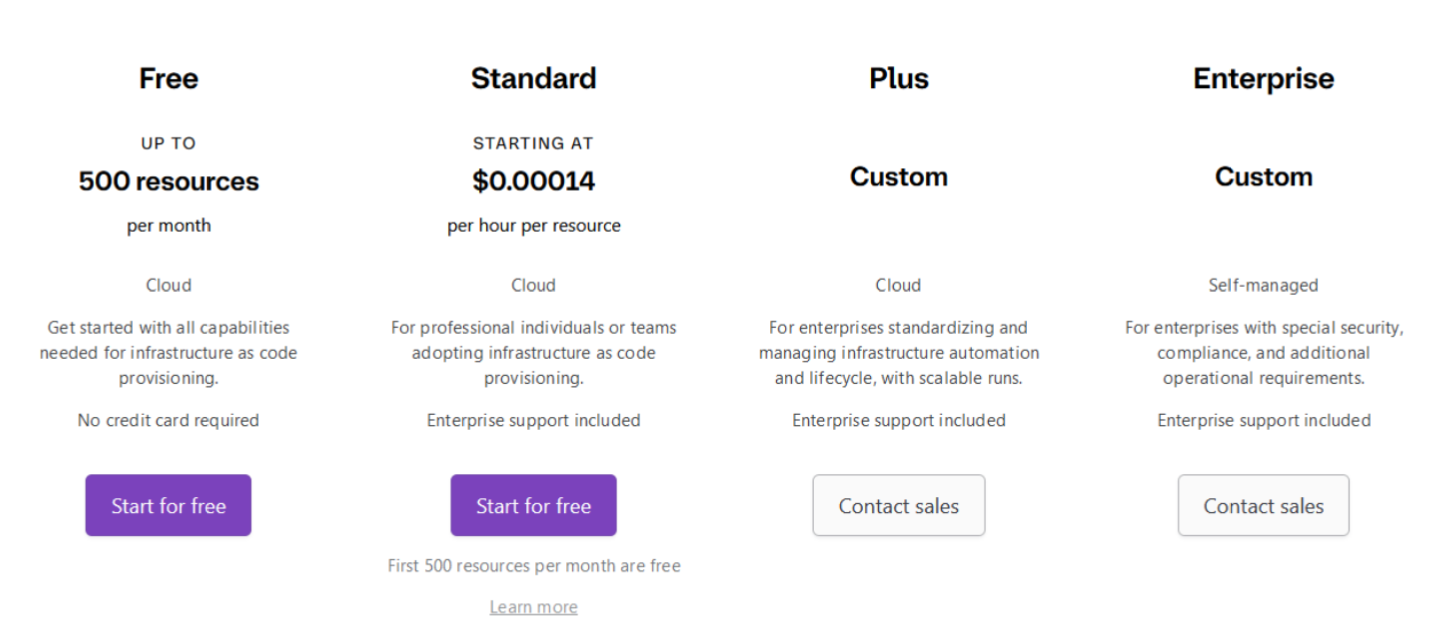
Here’s a simple breakdown of how this pricing works:
Free tier
The Free Tier allows teams to manage up to 500 resources per month at no cost. It’s ideal for smaller teams or those just starting with their infrastructure. However, this plan has limitations, such as fewer advanced features and no enterprise-level support. It's a good starting point for smaller teams, but as your infrastructure scales, you'll likely need to upgrade to a paid plan for additional features or resource support.
Standard plan
The Standard Plan is priced at $0.00014 per hour per resource, and the first 500 resources per month are free. This plan is suitable for professional teams looking to automate infrastructure provisioning. While it includes enterprise support, which offers advanced features like dedicated support, service-level agreements (SLAs), and access to priority assistance, the hourly cost can add up quickly for teams managing large numbers of resources, or have idle resources making it more expensive for those with extensive infrastructure needs.
Plus plan
The Plus Plan is custom-priced and tailored for enterprises that need scalable infrastructure management. It includes workflow automation features, such as automatically applying infrastructure changes like provisioning, as well as enterprise support. This makes it an ideal choice for larger organizations that require more advanced infrastructure management capabilities.
Enterprise plan
The Enterprise Plan is custom-priced for large companies with specific needs around security, compliance, and operations. It offers self-managed infrastructure, meaning the company is responsible for running and maintaining its own infrastructure, either on-premise or in the cloud, instead of relying on Terraform Cloud to do it for them. This approach gives the company more control and flexibility, with an overhead of having their own people to develop, manage, and support.
While Terraform Cloud offers flexible pricing, it may not always fit the specific needs of your organization. If your team requires more customization, stronger integrations with other tools, or more advanced security features, relying solely on Terraform Cloud can add complexity and force you to bring in additional tools. This can increase your operational costs over time. Terrateam offers a more feature-rich solution at a similar price, addressing those gaps directly without needing multiple features, keeping things simpler and more cost-effective.
Terrateam: Terraform Cloud alternative
Terrateam provides a GitHub-native experience with additional automation and customization, helping teams manage their infrastructure even more effectively. It’s built to simplify Terraform operations while offering advanced features, making it an ideal solution for teams looking for more functionality without moving to more costly enterprise-level solutions or managing multiple tools.
Key Features of Terrateam
Let’s discuss some of Terrateam's key features and offerings to efficiently manage your infrastructure.
GitHub Integration
To integrate Terrateam with GitHub, the setup process is very simple and involves just three main steps:
- Install the Terrateam GitHub Application: Firstly, install the Terrateam GitHub application against your GitHub organization.
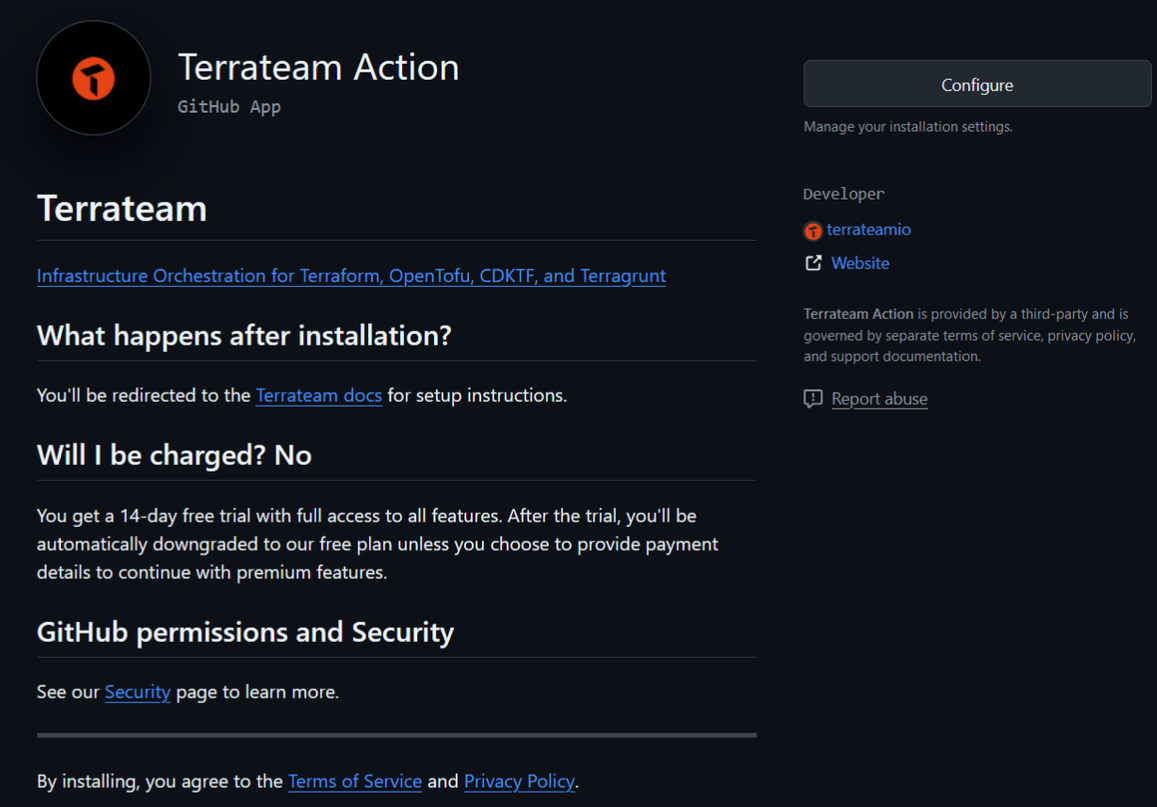
- Add the Terrateam GitHub Actions Workflow: Next, you just need to add the Terrateam GitHub Actions workflow file in .github/workflows as terrateam.yml. This file should be placed in your repository's default branch, which is typically main or master.

- Start Using Terrateam: Once configured, you can manage infrastructure changes directly from GitHub by creating or updating pull requests (PRs) with the help of Terrateam.
It was that simple to configure Terrateam with your GitHub repository and get started with managing your infrastructure directly through GitHub.
GitOps-Native Automation
Terrateam automates infrastructure management using GitOps principles. Once integrated with your GitHub repository, it tracks every change made via pull requests (PRs).
Here’s how it works:
-
Commit and Push: Commit and push changes (e.g., to your main.tf file) and create a pull request.
-
Terraform Plan: Terrateam will trigger a Terraform plan for you.

- Terraform Apply: Comment
terrateam applyon the PR, and Terrateam will trigger the apply action within your PR.
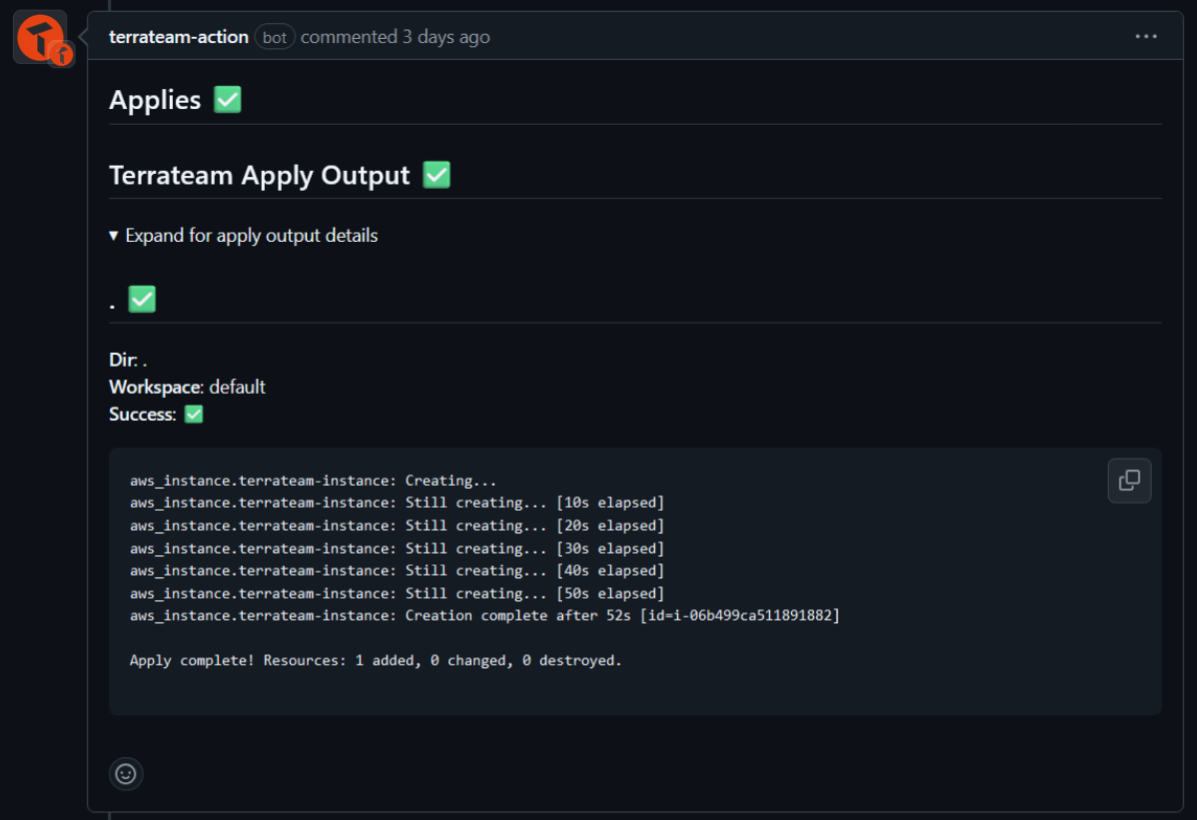
- Merge: Once the changes are validated, merge the pull request to main branch.

This workflow provided by Terrateam simplifies the infrastructure management by keeping all processes within GitHub itself.
Cost Estimation & Optimization
Terrateam provides cost estimation directly into your GitHub workflow. When you open or update a pull request, it calculates and displays the expected costs for the infrastructure changes that will be deployed as part of your desired changes.
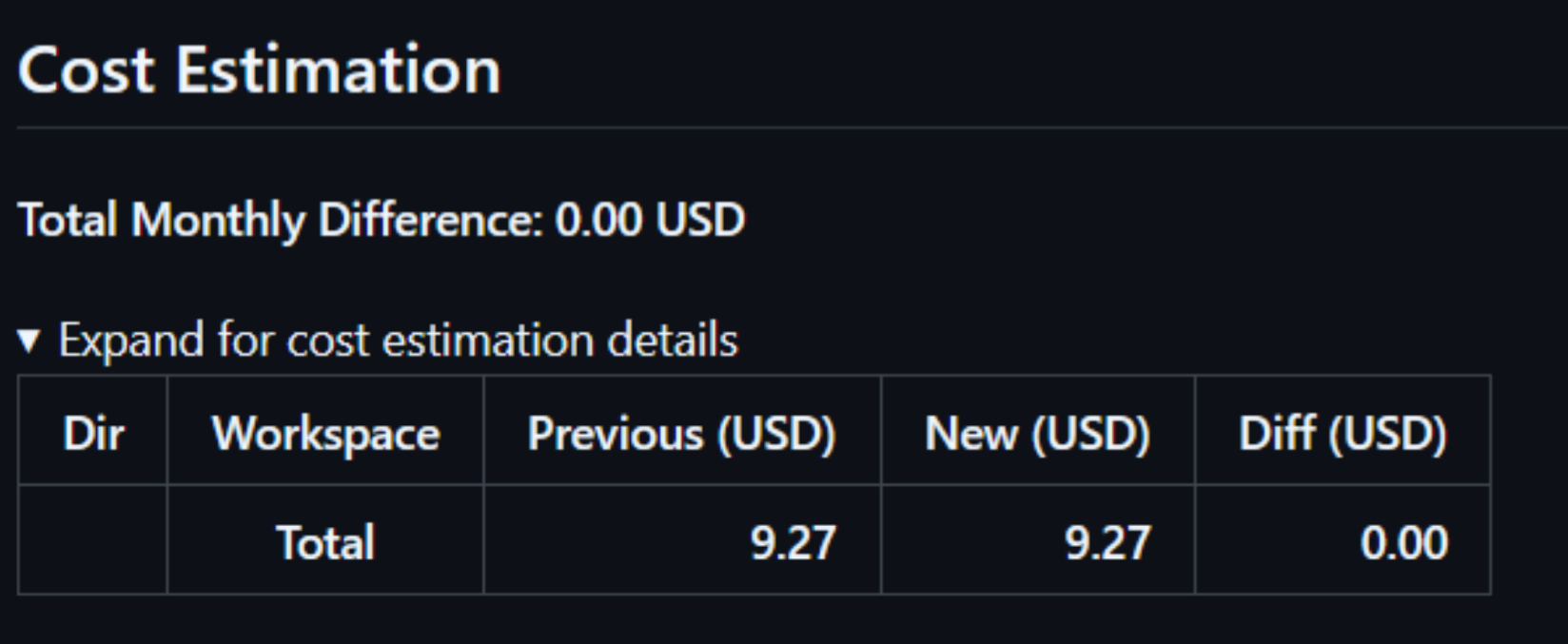
The above image shows the current cost, the new projected cost, and the difference between the two. This helps teams understand how their changes will impact the budget, making it much easier to manage costs, avoid surprises, and optimize infrastructure. By offering real-time cost insights, teams can make better decisions about their infrastructure spending and plan action items accordingly.
For more details, visit Cost Estimation.
Comprehensive Audit Trail
Terrateam also provides a comprehensive audit trail feature that logs all infrastructure changes and activities for complete transparency. Here, every pull request, plan, apply, and drift detection is tracked, showing details such as the user who initiated the action, the time of execution, and the result of the operation.

This detailed logging allows teams to track changes, identify issues, and maintain compliance standards across their organization. By having a complete history of the actions taken, teams can easily audit infrastructure changes and make sure everything is properly managed and accounted for before it causes any incidents.
For more, visit Terrateam Audit Trail.
Integration with Security & Compliance Tools
Terrateam helps keep your infrastructure secure and compliant by working with trusted tools, such as OPA and Checkov. These tools automatically scan and enforce policies with every infrastructure change, making sure that all updates follow security standards and avoid misconfigurations before they are deployed to environments such as dev and prod.
Integration with OPA
You can easily integrate OPA into your Terrateam workflow to ensure compliance by adding policy checks on each plan operation. These checks verify that all changes meet your defined rules before they are deployed. For example, using the conftest-wrapper in your .terrateam/config.yml file, you can automatically apply policies related to security, resource usage, or any custom rules.

For more details, visit Policy enforcement with OPA.
Integration with Checkov
Next, Terrateam is easily integrated with Checkov to scan Terraform plans for misconfigurations and security vulnerabilities before any changes are applied to your infrastructure. This automated process ensures that each pull request is checked for issues like open security risks or improper resource configurations.
To use Checkov in your workflow, add the checkov-wrapper in your .terrateam/config.yml file, and each plan will be automatically scanned for vulnerabilities and misconfigurations, reducing the risk of deploying insecure infrastructure.

For more details, visit Scan Plans with Checkov
Secure OIDC Authentication
Terrateam can securely authenticate with AWS, GCP, Azure/Tenant, or other cloud providers without credentials being exposed by leveraging OIDC via the GitHub identity provider. This a third-party identity provider like GitHub or GitLab.
OIDC is a secure, industry-standard authentication protocol.
OIDC (OpenID Connect) is an authentication protocol that leverages third-party providers like GitHub to provide access to cloud providers (such as AWS or GCP) without exposing credentials. Every major cloud provider supports federation which makes it significantly safer to authenticate against any of them securely without having to use long-lived credentials.
Layered Runs & Custom Workflows
Terrateam’s Layered Runs feature ensures your Terraform code is applied in the correct order by allowing you to define dependencies. Alongside custom workflows, it lets you tailor the steps during a Terraform operation, like setting environment variables, running custom commands, or triggering notifications, while guaranteeing the correct sequence of operations.
Granular Apply Requirements & RBAC
Apply requirements and Role-Based Access Control (RBAC) ensure specific conditions are met before changes to certain resources in your infrastructure can be applied. This is particularly useful in high-compliance environments where various checks must be completed before operating on the infrastructure. Users need defined access control permissions to perform specific actions in an environment. For instance, if IAM changes in a production environment require manual approvals from the security team before being applied by the SRE team, these rules can be easily configured with Terrateam.
Drift Detection & Reconciliation
Drift detection ensures live infrastructure stays synchronized against your repository. This gives teams confidence that what's deployed matches what's in their Terraform code repository. If a mismatched resource is discovered, it enters drifted state. With Terrateam, drift reconciliation can be configured to automatically reconcile cloud resources without any user intervention, ensuring that the real-world matches what’s in the source of truth.
Scalable SaaS and Enterprise Solutions
Terrateam is available in three deployment options:
- Hosted and managed SaaS platform by Terrateam
- Self-hosted on your own infrastructure
- Private Cloud, managed by Terrateam
Each solution offers the same comprehensive feature set and is highly adaptable, ensuring it meets your organization’s unique needs.
Conclusion
Terraform Cloud as a platform, with its features and capabilities, might not be the best solution for every use case. For such situations, other alternatives, such as Terrateam, provide more features at a similar price point, making it a suitable solution for teams seeking additional capabilities without compromising their budget. Ultimately, the right IaC platform depends on your team’s needs and infrastructure requirements.