How to Use GitOps with Terraform: A Real-World Guide
TL;DR
- Terraform GitOps treats infrastructure changes exactly like application code: every change goes through a pull request, gets reviewed, and is applied automatically on merge.
- Git becomes the single source of truth for all cloud infrastructure, no local applies, no credential sprawl, no infrastructure changes that skip review.
- A practical GitOps workflow uses GitHub Actions to run
terraform planon every pull request andterraform applyon merge, using short-lived OIDC credentials. - Tools like Terrateam automate this entire workflow natively inside GitHub, adding locking, policy enforcement, and drift detection without custom pipeline code.
If your team is still running terraform apply from a laptop, this practical guide covers how to implement a Terraform GitOps workflow with GitOps, GitHub Actions, and short-lived credentials from first principles: the why, the repo structure, the pipelines, and where purpose-built tooling earns its keep.
Infrastructure should be treated like code
Infrastructure should be managed like application code. However, for years, Terraform workflows looked nothing like modern software development.
Picture this. A developer runs terraform plan locally, applies infrastructure changes directly to production, then maybe commits to Git afterward. No code review, no approval process, no audit trail. Meanwhile, application code moves through pull requests, CI/CD pipelines, and peer review before touching production.
This disconnect created real problems. It was no longer effective infrastructure as code as the infrastructure drifted from the actual code. Changes happened without oversight. Credentials got copy-pasted around. Teams lost track of who changed what and when.
GitOps bridges this gap. It treats infrastructure changes exactly like application deployments: pull requests for review, automated testing in continuous integration, approval gates before production environments, and OIDC for secure authentication. Every change is traceable. To learn how to implement these patterns with GitHub Actions, see our detailed guide on Building a CI/CD Pipeline for Terraform with GitHub Actions.
It's not revolutionary technology. It's Git, CI, Terraform, and the same discipline your development teams already practice. The only difference is applying those proven patterns to infrastructure management.
Modern teams adopted GitOps not because it was trendy, but because they were tired of treating cloud infrastructure management like it was 2010 while their applications lived in 2024.
The real cost of running Terraform apply from a laptop
The problems compound quickly once you look at them together. Local applies mean credentials, secrets, and Terraform state can spread across laptops, with no control over who applied what and no central logs to reference.
Without a pull-request-driven GitOps workflow, you lose critical review gates: no enforced approval process, no historical trace, and no way to verify the intent behind infrastructure as code changes. Teams often discover production resources that were never defined in infrastructure code, or worse, defined incorrectly and later overwritten, because without reconciliation or automated drift detection, it's easy for multiple environments to fall out of sync with whatever's actually in your git repository.
Inconsistent CI implementations round it all out, one repository uses terraform init && terraform plan, another runs outdated shell scripts, and yet another requires SSHing into a Jenkins box, with secrets manually injected and pipelines that are hard to reproduce and harder to scale.
GitOps changes that
GitOps enforces a single source of truth: Git. Under a GitOps Terraform model, infrastructure changes must go through pull requests. Your CI pipeline runs terraform plan, posts the output to the pull request, and waits for human approval. Once merged, automation runs terraform apply using secure, short-lived credentials via GitHub OIDC, and logs everything.
This model brings:
- Centralized workflows
- Immutable audit trails
- Standardized applies
- Drift detection
The result is centralized workflows, immutable audit trails, standardized applies across multiple environments, and drift detection that keeps the actual state of your cloud infrastructure aligned with what's defined in code. None of it is new technology. It's Git, Terraform, CI, and some discipline, wired together to enforce predictability and scale. That's why operations teams are adopting GitOps now, because it solves the problems they've been living with for years.
What Terraform GitOps actually means in practice
At its core, GitOps is about applying the same operational discipline we already use for application code: version control, peer review, automated pipelines. No new toolchain, just a clear model. Git is the single source of truth, pull requests are the gate, and automation is the executor.
If something isn't in your git repository, it doesn't exist. That's the baseline. Your Terraform modules, your environment configuration files, even your CI workflows, everything is tracked. This gives you a single place to audit, a single place to debug, and a clear history of every infrastructure change.
GitOps enforces change through pull requests, which means no one pushes infrastructure changes to a production environment without a diff being reviewed. CI pipelines run terraform plan on the pull request and post the output for everyone to see. It's not just about catching mistakes, it's about enforcing accountability and knowledge sharing across the whole team.
And there's no running terraform apply from a terminal anymore.
The apply happens via CI once the pull request is merged. Credentials are injected securely, usually via GitHub OIDC and IAM roles, so there are no long-lived access tokens, no one-off scripts, and no finger-pointing when things break.
The fourth principle is continuous reconciliation. With a Terraform GitOps setup, the live environment is supposed to match what's in Git at all times. If a resource drifts, maybe because someone made a manual change through the cloud console, that configuration drift gets detected. Depending on your setup, it can be flagged for review or auto-corrected.
Either way, Git becomes the truth again.
GitOps works with any infrastructure toolchain
Terraform isn't the only tool that fits this model, though it's one of the best suited given its declarative infrastructure model and wide provider ecosystem spanning multiple cloud services.
When you define your desired state in Terraform configuration files, store it in a GitHub repository, and structure it around pull requests and CI pipelines, each pull request runs terraform plan in CI, and on merge, apply happens automatically in a secure environment using short-lived credentials.
Cloud-native tools like CloudFormation or Bicep follow the same pattern: store templates in Git, validate infrastructure changes via CI, and only deploy through automation. You can gate changes with policies like OPA or Conftest and ensure production is only touched after approvals.
Managing secrets, access, and Terraform state is often what makes or breaks GitOps for infrastructure management. Use backends like S3 for Terraform state and remove all manual access. Secrets should never touch the git repository; they should be stored in vaults like AWS Secrets Manager or SOPS and accessed only during runtime.
GitOps also lets you split workflows cleanly across multiple environments: separate folders or modules with isolated backends, stricter gating for production environments than for dev, and blast radius limited by design.
GitOps isn't just for deploying containers. It's a natural fit for managing infrastructure across any cloud, any stack.
Building a Terraform GitOps pipeline from scratch
Now that we've established that GitOps isn't limited to Kubernetes and fits perfectly with infrastructure as code workflows, here's what it looks like in practice with Terraform and GitHub Actions.
This is the roll-your-own approach: no platform dependencies, no magic wrappers. Just you, your infrastructure code, and GitHub. It's especially useful for teams who want to stay close to the underlying tools and maintain full control over their pipelines, secrets, and deployment logic.
A repository structure that reflects your environments
The following directory tree lays out a typical repository with Terraform code.
├── envs/
│   ├── prod/
│   │   └── main.tf
│   └── dev/
│       └── main.tf
├── modules/
│   ├── network/
│   └── compute/
└── .github/
    └── workflows/
        ├── plan.yml
        └── apply.yml
The envs/ directory holds your environment-specific configurations, modules/ contains reusable Terraform modules, and .github/workflows/ holds your CI pipeline definitions. Organizing environments in separate directories creates isolation, keeps state files separated, and limits blast radius when something goes wrong.
Running Terraform plan on every pull request
Your first workflow should trigger on pull requests to the main branch. The goal is to initialize Terraform with terraform init and run terraform plan, then post the plan output back to the pull request for review.
# .github/workflows/plan.yml
name: Terraform Plan
on:
  pull_request:
    paths:
      - 'envs/**'

jobs:
  plan:
    runs-on: ubuntu-latest
    permissions:
      id-token: write
      contents: read
      pull-requests: write
    strategy:
      matrix:
        include:
          - environment: dev
            directory: envs/dev
          - environment: prod
            directory: envs/prod
    steps:
    - uses: actions/checkout@v4
      with:
        fetch-depth: 0

    - name: Check if environment changed
      id: check-changes
      run: |
        # Check if any files in this specific environment directory changed
        if git diff --name-only origin/${{ github.base_ref }}...HEAD | grep -q "^${{ matrix.directory }}/"; then
          echo "changed=true" >> $GITHUB_OUTPUT
          echo "Directory ${{ matrix.directory }} has changes"
        else
          echo "changed=false" >> $GITHUB_OUTPUT
          echo "Directory ${{ matrix.directory }} has no changes"
        fi

    - name: Set up Terraform
      if: steps.check-changes.outputs.changed == 'true'
      uses: hashicorp/setup-terraform@v3
      with:
        terraform_wrapper: false

    - name: Terraform Init
      if: steps.check-changes.outputs.changed == 'true'
      run: terraform init
      working-directory: ${{ matrix.directory }}

    - name: Terraform Plan
      if: steps.check-changes.outputs.changed == 'true'
      id: plan
      run: |
        set +e
        terraform plan -no-color -out=tfplan 2>&1 | tee plan_output.txt
        echo "exit_code=${PIPESTATUS[0]}" >> $GITHUB_OUTPUT
        set -e
      working-directory: ${{ matrix.directory }}

    - name: Post Plan to PR
      if: steps.check-changes.outputs.changed == 'true'
      uses: actions/github-script@v7
      with:
        script: |
          const fs = require('fs');
          const path = require('path');
          const directory = '${{ matrix.directory }}';
          const environment = '${{ matrix.environment }}';
          const exitCode = '${{ steps.plan.outputs.exit_code }}';
          const planPath = path.join(directory, 'plan_output.txt');

          let planOutput = '';
          try {
            planOutput = fs.readFileSync(planPath, 'utf8');
          } catch (error) {
            planOutput = `Error reading plan output: ${error.message}`;
          }

          const status = exitCode === '0' ? '✅ Plan Succeeded' : '❌ Plan Failed';
          const icon = exitCode === '0' ? '✅' : '❌';

          // Truncate if too long
          const maxLength = 40000;
          const truncatedPlan = planOutput.length > maxLength ?
            planOutput.substring(0, maxLength) + '\n\n... [Output truncated - view full output in Actions logs]' :
            planOutput;

          const body = `### ${icon} Terraform Plan: \`${environment}\` environment

          **Status:** ${status}
          **Directory:** \`${directory}\`
          **Exit Code:** ${exitCode}

          <details markdown="1">
          <summary>📋 Show Plan Output</summary>

          \`\`\`hcl
          ${truncatedPlan}
          \`\`\`

          </details>

          ---
          *Triggered by changes in \`${directory}\`*`;

          github.rest.issues.createComment({
            issue_number: context.issue.number,
            owner: context.repo.owner,
            repo: context.repo.repo,
            body: body
          });
This keeps reviewers in the loop, allows for early feedback, and ensures nothing gets merged without full visibility into what's about to change.
Terraform apply on merge
Once a pull request is reviewed and merged, a separate workflow handles the actual terraform apply. This is where infrastructure changes become real.
# .github/workflows/apply.yml
name: Terraform Apply
on:
  push:
    branches:
      - main
      - master
    paths:
      - 'envs/**'

jobs:
  apply:
    runs-on: ubuntu-latest
    permissions:
      contents: read
      pull-requests: write
    strategy:
      matrix:
        include:
          - environment: dev
            directory: envs/dev
          - environment: prod
            directory: envs/prod
          - environment: staging
            directory: envs/staging
    steps:
    - uses: actions/checkout@v4
      with:
        fetch-depth: 2

    - name: Check if environment changed
      id: check-changes
      run: |
        # Check if any files in this specific environment directory changed in the last commit
        if git diff --name-only HEAD~1 HEAD | grep -q "^${{ matrix.directory }}/"; then
          echo "changed=true" >> $GITHUB_OUTPUT
          echo "Directory ${{ matrix.directory }} has changes"
        else
          echo "changed=false" >> $GITHUB_OUTPUT
          echo "Directory ${{ matrix.directory }} has no changes"
        fi

    - name: Set up Terraform
      if: steps.check-changes.outputs.changed == 'true'
      uses: hashicorp/setup-terraform@v3
      with:
        terraform_wrapper: false

    - name: Terraform Init
      if: steps.check-changes.outputs.changed == 'true'
      run: terraform init
      working-directory: ${{ matrix.directory }}

    - name: Terraform Apply
      if: steps.check-changes.outputs.changed == 'true'
      id: apply
      run: |
        set +e
        terraform apply -auto-approve -no-color 2>&1 | tee apply_output.txt
        echo "exit_code=${PIPESTATUS[0]}" >> $GITHUB_OUTPUT
        set -e
      working-directory: ${{ matrix.directory }}

    - name: Find PR for this commit
      if: steps.check-changes.outputs.changed == 'true'
      id: find-pr
      uses: actions/github-script@v7
      with:
        script: |
          const { data: prs } = await github.rest.pulls.list({
            owner: context.repo.owner,
            repo: context.repo.repo,
            state: 'closed',
            sort: 'updated',
            direction: 'desc',
            per_page: 10
          });

          for (const pr of prs) {
            if (pr.merge_commit_sha === context.sha) {
              console.log(`Found PR #${pr.number} for commit ${context.sha}`);
              return pr.number;
            }
          }

          console.log(`No PR found for commit ${context.sha}`);
          return null;

    - name: Post Apply Result to PR
      if: steps.check-changes.outputs.changed == 'true' && steps.find-pr.outputs.result != 'null'
      uses: actions/github-script@v7
      with:
        script: |
          const fs = require('fs');
          const path = require('path');
          const directory = '${{ matrix.directory }}';
          const environment = '${{ matrix.environment }}';
          const exitCode = '${{ steps.apply.outputs.exit_code }}';
          const prNumber = ${{ steps.find-pr.outputs.result }};
          const applyPath = path.join(directory, 'apply_output.txt');

          let applyOutput = '';
          try {
            applyOutput = fs.readFileSync(applyPath, 'utf8');
          } catch (error) {
            applyOutput = `Error reading apply output: ${error.message}`;
          }

          const status = exitCode === '0' ? '✅ Apply Succeeded' : '❌ Apply Failed';
          const icon = exitCode === '0' ? '✅' : '❌';

          // Truncate if too long
          const maxLength = 40000;
          const truncatedOutput = applyOutput.length > maxLength ?
            applyOutput.substring(0, maxLength) + '\n\n... [Output truncated - view full output in Actions logs]' :
            applyOutput;

          const body = `### ${icon} Terraform Apply: \`${environment}\` environment

          **Status:** ${status}
          **Directory:** \`${directory}\`
          **Exit Code:** ${exitCode}

          <details markdown="1">
          <summary>📋 Show Apply Output</summary>

          \`\`\`hcl
          ${truncatedOutput}
          \`\`\`

          </details>

          ---
          *Applied changes from \`${directory}\`*`;

          github.rest.issues.createComment({
            issue_number: prNumber,
            owner: context.repo.owner,
            repo: context.repo.repo,
            body: body
          });
This setup ensures that applies only happen after a review and a successful merge. All infrastructure changes are logged, reproducible, and traceable back to a specific pull request and a specific commit.
What this basic setup actually gives you
This basic Terraform GitOps setup with GitHub Actions gives you secure, repeatable deployments, an auditable change history, pull-request-based approvals and reviews, clean separation of multiple environments, and full control over every step.
No third-party GitOps platform. No black boxes. Just Terraform, GitHub Actions, and a sane delivery model. Once the basics are in place, you can layer in policy checks, module validation, drift detection, and even preview environments.
Where glue code becomes a liability
Terrateam is GitOps-native and built for Terraform. It runs plan and apply through pull requests, enforces policy, and manages workflows entirely inside your version control system. Today that's GitHub, with GitLab, Bitbucket, and Azure DevOps coming soon. No brittle workflow files required. Just infrastructure that flows through Git.
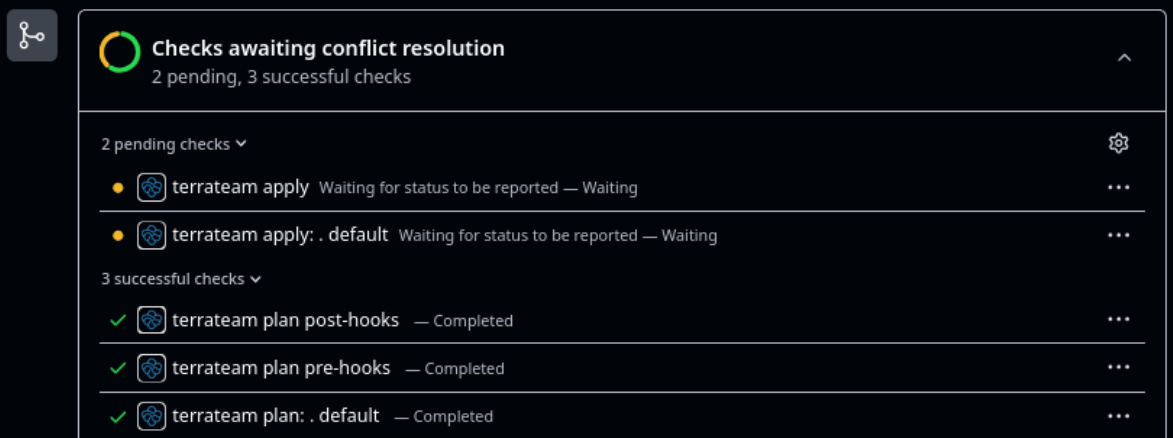
How Terrateam works
When a developer opens a pull request with Terraform changes, Terrateam automatically runs terraform plan and posts the output as a comment in the pull request. Once the pull request is approved and merged, it handles the apply, safely gated behind GitHub branch protection rules, RBAC, and configurable workflows.
There's no need to write custom scripts or wire together a dozen GitHub Actions. You define everything in a simple YAML configuration file at the root of your repository, and Terrateam takes care of the rest.
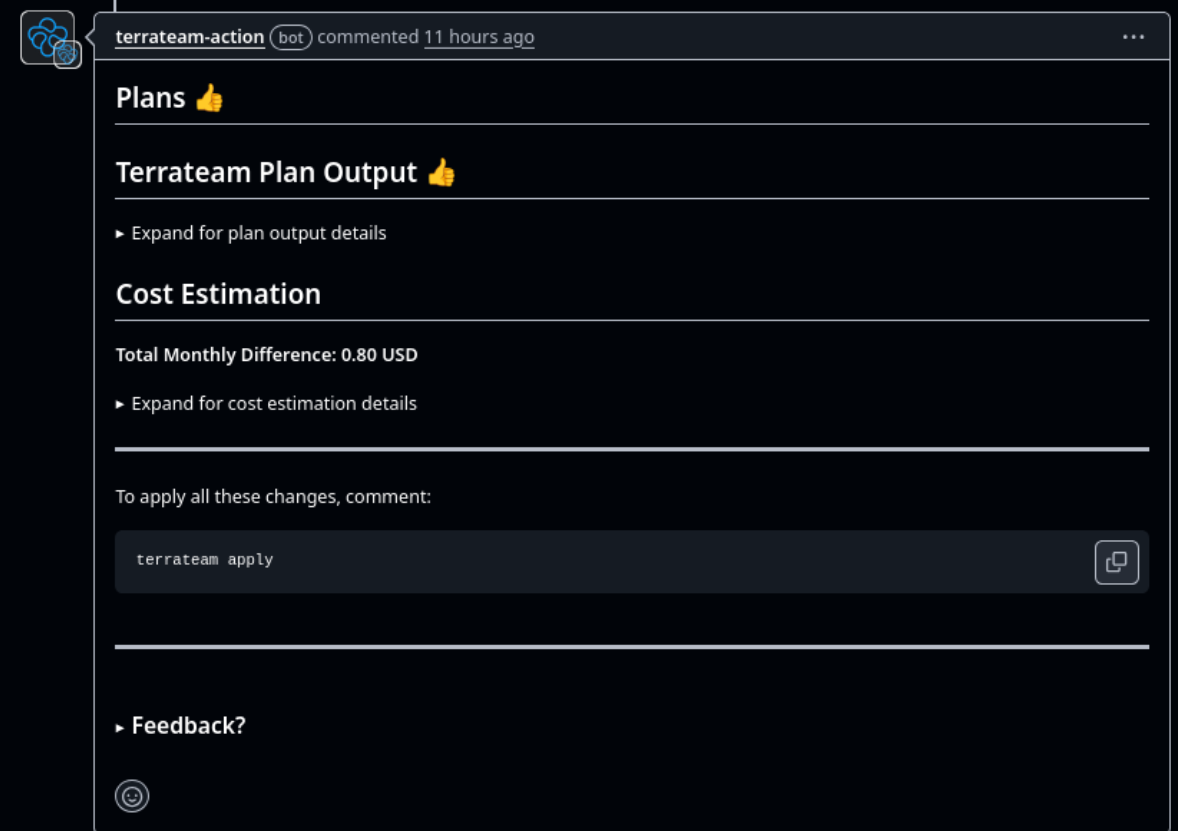
Concurrency is not a theoretical problem
Terrateam also solves the concurrency problem that plagues many operations teams. When multiple developers are working on infrastructure in parallel, you risk clobbering state or creating configuration drift within your infrastructure.
Terrateam prevents this by locking directories or workspaces automatically during an apply. If another pull request tries to run an apply on the same target, it waits its turn. It's one of those details that seems small until you've seen a production outage caused by two concurrent infrastructure changes.
Environment-specific workflows that match how your org actually works
You can define separate workflows per environment. Dev and staging might apply on merge, while production applies only with explicit approval from a specific team. Each environment can use its own backend configuration, variable sets, and policies. It's straightforward to map your organization's existing SDLC into Terrateam's model.
Security and policy enforcement built in, not bolted on
Security is another area where Terrateam goes beyond what you'd typically script by hand. It uses GitHub's OIDC support to fetch short-lived credentials for your cloud provider, so you don't have to manage or rotate static secrets in CI. You also get full Open Policy Agent integration, so you can write and enforce custom rules using Rego, for example, blocking untagged resources or enforcing naming conventions, before changes ever make it to production.
Drift detection that catches what manual processes miss
Even drift detection is built in.
Terrateam can regularly check whether your deployed infrastructure still matches the Terraform state, and notify you when something goes out of sync. Git-based workflows like this help catch configuration drift early, especially in teams where manual changes through the Terraform cloud console tend to sneak in.
Running inside GitHub, without the extra dashboard
Everything runs inside GitHub. There's no extra dashboard to manage, no context switching. And for teams that need tighter control, Terrateam is open source infrastructure under the MPL-2.0 license and offers a self-hosted deployment model.
Terraform GitOps without the guesswork
In practice, Terrateam makes Terraform GitOps and infrastructure management predictable and safe. Developers open pull requests, reviewers approve, and Terrateam handles the rest: automated plans, gated applies, locking, auditability, and policy enforcement. It's Terraform GitOps without the guesswork or glue code.
If your team is already using GitHub, adding Terrateam is a straight path to better automation, tighter controls, and fewer surprises in production.