How to Use Terraform Merge Function
Let’s say you are working on a small project with just one or two environments. The setups are simple, and changes are also easy to manage. You update a few configurations, and everything works as it should.
However, as the project scales, things start to get a bit complicated. New environments are added, and configurations in the staging environment may no longer match the production environment. Security rules are different in each environment, and updates like new instance types are applied in one environment but missed in another environment. These mismatches can cause deployment failures and unexpected issues within your infrastructure.
To solve these kinds of issues, Terraform provides features like merge and concat. These functions help you manage configurations more effectively, making sure that everything stays consistent across environments as your project scales.
In this blog, we will see how these functions can make your work simpler, reduce mistakes, and help you manage Terraform configurations better as your projects scale.
The Merge Function in Terraform
The merge function in Terraform is used to combine multiple maps into one. Maps are just a set of key-value pairs. You can give the merge function with two or more maps, and it will return a single map with all the key-value pairs from the input maps. If the same key exists in more than one map, the value from the last map will replace the earlier ones.
For example, consider a map like this:
{
  region = "us-west-1"
  instance_type = "t2.micro"
}
Here, region and instance_type are the keys, and their corresponding values are us-west-1 and t2.micro. If the same key exists in more than one map, the value from the last map will overwrite the earlier ones.
The syntax for using the merge function is:
merge(map1, map2, ...)
This allows you to combine maps while resolving conflicts based on the order in which the maps are provided.
Concat Function in Terraform
The concat function in Terraform is used to combine multiple lists into one. A list is an ordered collection of values, such as server names, availability zones, or resource tags. Using lists in Terraform helps organize infrastructure configurations and reduce repetition.
For example, instead of defining three separate instances individually, you can create a list with their names and loop through it to deploy them automatically. This simplifies the configuration and makes it easier to manage.
The syntax for the concat function is:
concat(list1, list2, ...)
For example, consider two lists:
list1 = ["app-server", "db-server"]
list2 = ["cache", "monitor"]
Using the concat function to combine these lists will give you:
["app-server", "db-server", "cache", "monitor"]
This unified list can then be used in your Terraform configurations to manage resources more efficiently.
How the Merge and Concat Function Works in Terraform
In Terraform, managing your Terraform configurations across multiple environments or resources can get complicated as projects scale. The merge and concat functions are effective features for simplifying this process. They allow you to handle maps and lists efficiently, ensuring consistency and reducing configuration redundancy.
The merge function combines multiple maps into one. A map in Terraform is a collection of key-value pairs, such as instance types, colors, or parameters specific to an environment. This function helps avoid duplicating or rewriting configurations across different setups by layering changes on top of a base configuration.
The merge function processes each map in the order they are provided. When two or more maps contain the same key, the value from the last map takes precedence. This allows you to start with a general configuration and apply more specific changes as needed.
Imagine you have three maps:
- Base Configuration:
{ "size": "medium", "color": "blue" }
- Customization:
{ "size": "large", "material": "cotton" }
- Override Configuration:
{ "color": "red" }
When these maps are passed through the merge function:
- The base map sets the initial values: size is “medium,” and the color is “blue.”
- The second map updates its size to “large” and adds a new key material with the value “cotton.”
- The third map overrides color to “red” while leaving size and material unchanged.
This approach removes the need to edit many configuration files and keeps configurations consistent. For example, in environments like dev, staging, and production, you can keep a base configuration while easily adding specific changes for each environment.
Now, the concat function combines multiple lists into one. A list in Terraform is an ordered collection of values, such as server names, instance types, or availability zones. By using concat, you can merge these lists into a single list without repeating or missing elements.
The function takes two or more lists as input and processes them in the given order. Suppose you are defining different types of servers within your infrastructure:
variable "list1" {
  default = ["web-server", "db-server"]
}
variable "list2" {
  default = ["cache", "monitor"]
}
Using the concat function to combine these lists:
output "combined_list" {
  value = concat(var.list1, var.list2)
}
The resulting list will look like this:
["web-server", "db-server", "cache", "monitor"]
Here is how it works step by step:
- The elements in the first list, [“web-server”, “db-server”], are included first.
- The elements in the second list, [“cache”, “monitor”], are added right after the first list.
- The result is a single, ordered list containing all four elements.
By using concat, you can avoid managing multiple lists separately and make sure that all required elements are accounted for in your configurations. This makes handling resources across environments more precise and less prone to errors.
Why Use the Merge Function?
Terraform's merge() and concat() functions are important features for managing your configurations. These functions address challenges in infrastructure management by enabling users to combine default configurations, custom inputs, and environment-specific overrides into a unified config. Let's explore their key applications:
Applications of the Merge Function
- Combining Defaults with Custom Inputs: Most setups begin with default configurations that define configurations like instance types or tags. For example, you might set a default instance type of “t2.micro” for testing environments but require “m5.large” in production. The
merge()function makes it easy to layer these custom values on top of defaults without duplicating shared configurations like monitoring configurations or security groups. - Managing Multi-Environment Setups: Managing infrastructure for multiple environments, such as development, staging, and production, can become complex. Some configurations, such as IAM roles or network policies, remain consistent across all environments, while others need to be customized. For example, production might need larger instance sizes or stricter security rules than development. The
merge()function helps by letting you define a shared base configuration for the common configurations and then add environment-specific changes. This ensures consistency across environments while meeting their unique needs. - Simplifying Nested Configurations: Infrastructure configurations often involve multiple nested configurations representing relationships between different resources. The
merge()function is helpful in these situations because it can efficiently combine nested maps. It preserves the relationships between resources, such as associating subnets with their respective networks. This reduces the risk of mistakes, such as misaligned dependencies or missing configurations, and makes the overall setup more manageable. - Resolving Conflicts Predictably: Resolving conflicts is easy with the
mergefunction. For example, if your base configuration uses “us-east-1” but you override it with “us-west-2” for a specific case, themergefunction will use “us-west-2” because it comes later. This ensures the final configuration is clear and consistent.
Applications of the Concat Function
- Combining Multiple Lists for Efficient Resource Management: When managing infrastructure, we often need to deal with multiple lists of resources, like instances, databases, or network components. Without a function like
concat(), managing these lists might be difficult, and they can become difficult to maintain. Theconcat()function simplifies this by combining several lists into one, allowing you to manage resources more quickly. For example, you can start with a list of server names for your development environment and then add a list for your production environment, keeping them organized in a single combined list. - Dynamic Scaling with Flexibility: As your infrastructure scales, you may need to add more components, such as additional servers or storage. Using
concat(), you can easily extend existing lists with new items, such as adding new servers to a region or creating new databases for a service. Instead of modifying configurations across several configuration files, you can simply update the list, and Terraform will handle the rest. This scaling lets you adapt your infrastructure needs without the overhead of adjusting configurations in multiple places. - Consistency Across Different Environments: For example, a resource like an IAM role might be needed in all environments, but other resources, like instance sizes or regions, may change depending on the environment. The
concat()function allows you to create a base list that’s consistent across all environments while adding specific resources as needed for each environment. This ensures that your infrastructure remains consistent regardless of the environment. - Reducing Redundancy: Without the
concat()function, you might need to copy and paste the same list of elements between different configuration files, leading to redundancy and increasing the risk of errors. concat() helps you avoid this by combining the lists in one place, making them easier to manage and reducing the chances of mistakes. Instead of updating every list across multiple files, you only need to update the combined list, keeping everything organized.
Using merge() and concat() Function in Terraform
Now, in this section, we will explore how the merge and concat functions simplify infrastructure management by combining configurations and lists effectively, helping you maintain clarity and consistency across all environments.
Combining Shared and Environment-Specific Configurations
When managing multiple environments, such as development, staging, and production, you often need a mix of shared configurations and environment-specific settings. Here, merge() helps by overlaying environment-specific changes on top of a base configuration.
First, define the base configuration: The common configurations, such as instance type and shared tags, are hosted on the base map.
variable "base_config" {
  default = {
    instance_type = "t2.micro"
    tags = {
      owner = "team-infra"
    }
  }
}
Now, add some environment-specific overrides. These maps are adjusted for individual environments. For example, the dev_config maps the instance size lower, and the prod_config maps the instance size higher for heavier workloads.
variable "dev_config" {
  default = {
    instance_type = "t2.small"
    tags = {
      environment = "dev"
    }
  }
}

variable "prod_config" {
  default = {
    instance_type = "m5.large"
    tags = {
      environment = "prod"
    }
  }
}
Combine these specifics using the merge function. This merges the base and environment-specific maps, giving a complete configuration for each environment.
locals {
  dev_full_config  = merge(var.base_config, var.dev_config)
  prod_full_config = merge(var.base_config, var.prod_config)
}
This helps get configurations that retain shared configurations like tags and use instance size and environment tags specific to development and production, which might also be used individually.
Adding User Input to a Default Configuration
Now, as the project scales and new environments are introduced, user-specific inputs are necessary to customize each environment's configurations.
For example, you can define a base configuration with default values:
variable "base_config" {
  default = {
    instance_type = "t2.micro"
    tags = {
      owner = "team-infra"
    }
  }
}
As users provide new inputs, these configurations can override the defaults:
variable "user_inputs" {
  default = {
    region = "us-east-1"  # User-provided region
    tags = {
      team = "ops"         # User-provided tag
    }
  }
}
Using the merge function, user inputs can be easily combined with the base configuration:
locals {
  merged_config = merge(var.base_config, var.user_inputs)
}
This makes sure that user-provided configurations are included while keeping default configurations as a backup. As the project scales and configurations become more complicated, this approach helps handle differences across environments, avoids mismatches, and makes updates easier.
Handling Conflicting Keys
Now, let's consider a cloud storage setup where you must define a basic storage configuration and later update it with region-specific details.
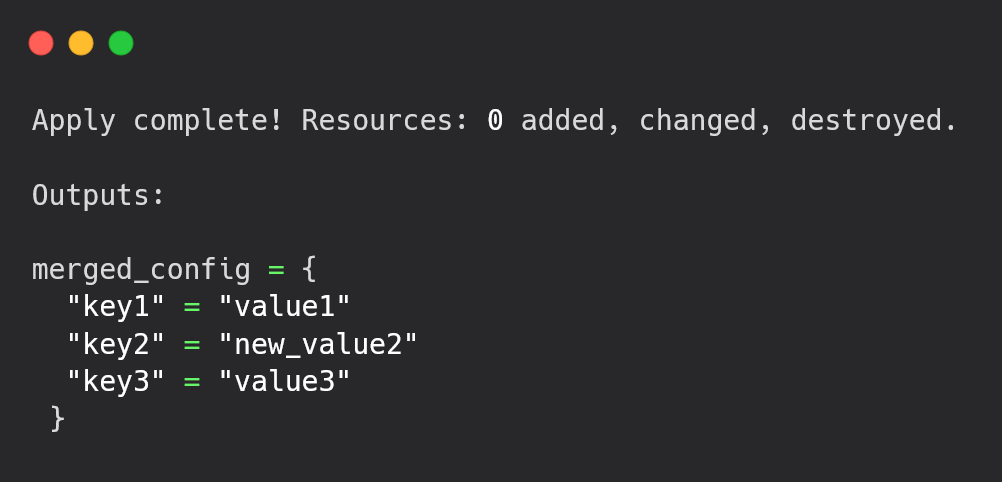
Base Storage Configuration (map1):
variable "base_storage" {
  default = {
    bucket_name = "my-app-storage"
    acl         = "private"
  }
}
Region-Specific Configuration (map2):
variable "us_east_storage" {
  default = {
    region = "us-east-1"
    encryption = "AES256"
  }
}
You want to merge these maps so that the region and encryption configurations are added to the base storage configuration while keeping the bucket_name and acl configurations intact:
locals {
  storage_config = merge(var.base_storage, var.us_east_storage)
}
output "storage_config" {
  value = local.storage_config
}
In this configuration, the region and encryption configuration from us_east_storage are added to the base_storage. The bucket_name and acl are preserved from the base configuration.
If you add another region-specific configuration, such as for us-west-2, it will override these values accordingly.
This ensures that configurations specific to a region are always included, and the base configurations are retained without extra work from your end.
Simplified Backends Configurations
Let’s suppose you have a multi-cloud setup; you might use different configurations for each provider but want to keep some configurations common across all providers.
Start with a configuration common to all providers:
variable "shared_config" {
  default = {
    bucket = "shared-state-bucket"
    version = "v1"
  }
}
You then define provider-specific overrides, like for AWS:
variable "aws_config" {
  default = {
    region = "us-west-2"
    instance_type = "t2.medium"
  }
}
You can now merge the shared configuration with the AWS-specific overrides:
locals {
  aws_backend_config = merge(var.shared_config, var.aws_config)
}

output "aws_backend_config" {
  value = local.aws_backend_config
}
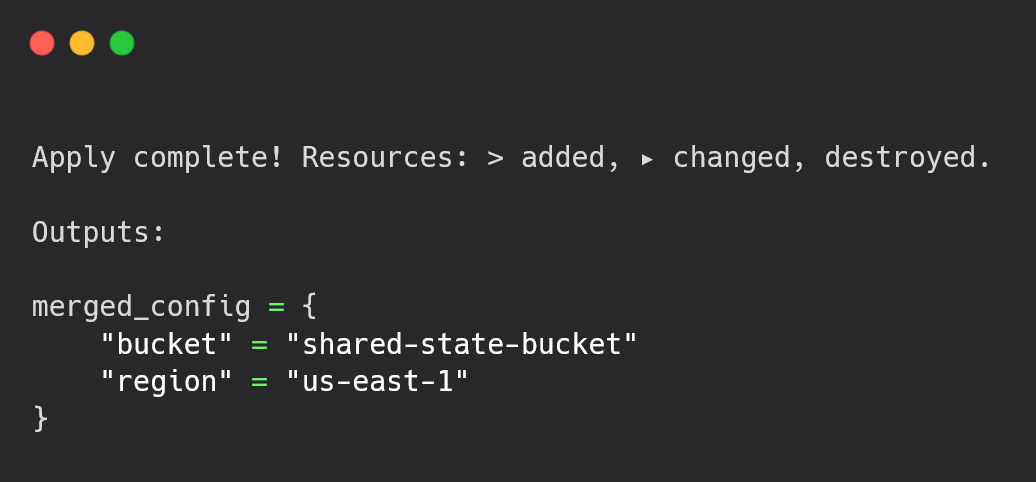
Here, for AWS, the region and instance_type are set to AWS-specific values, while the shared configurations like bucket and version are retained.
Working with Nested Maps
Managing configurations is clear. For example, you might define a basic database setup with a map like this:
variable "nested_map1" {
  default = {
    db = {
      name     = "app_db"
      username = "admin"
    }
  }
}
As the project scales, you may need to adjust these configurations for different environments or specific requirements. You might define another map for provider-specific overrides:
variable "nested_map2" {
  default = {
    db = {
      username = "user"
      password = "securepassword"
    }
  }
}
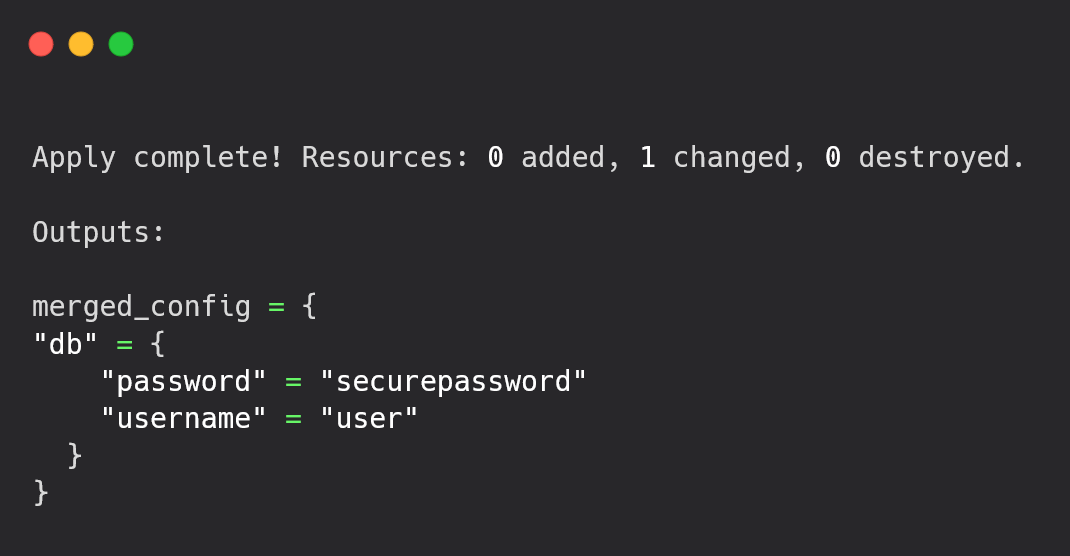
You can use the merge function to combine the two maps and resolve any conflicts. For example, the username from the second map will override the first one, and the password key will be added:
output "merged_nested_map" {
  value = merge(var.nested_map1, var.nested_map2)
}
This approach works well for minor adjustments, but nested maps can become more complicated to manage as your project scales and more configurations are added. The merge function doesn’t merge nested structures deeply, so if you need more complex handling, it’s important to be aware of this limitation.
As your infrastructure scales, these minor configuration mismatches can lead to inconsistencies across environments, and managing them becomes even more challenging. In this scenario, understanding how Terraform handles nested maps and using the right merging strategies can help maintain consistency and prevent deployment issues.
Combining Multiple Lists
When managing multiple environments like development, staging, and production, you may have separate lists of servers for each. For example, you might define environment-specific server lists as follows:
variable "dev_servers" {
  default = ["dev-server-1", "dev-server-2"]
}

variable "stg_servers" {
  default = ["stg-server-1", "stg-server-2"]
}

variable "prod_servers" {
  default = ["prod-server-1", "prod-server-2"]
}
Managing separate lists can get difficult as the project scales, especially when you need a single list of all servers across environments. The concat function solves this by combining the lists into one.
output "all_servers" {
  value = concat(var.dev_servers, var.stg_servers, var.prod_servers)
}
This way, you can combine the development, staging, and production server lists into a single list named all_servers, making it easier to manage and deploy across all environments at the same time.
Concatenating Lists with Mixed Data Types
When starting with a simple infrastructure, managing lists of instances or resources across environments like development, staging, and production is relatively simple. You may define separate lists for each environment like this:
variable "list1" {
  default = ["apple", "banana"]
}

variable "list2" {
  default = ["carrot", "potato"]
}
This works well when dealing with only a few environments or resources. You can quickly merge these lists using the concat function:
output "combined_list" {
  value = concat(var.list1, var.list2)
}
However, errors can occur as your project scales and you start managing more complex infrastructure. You might face issues if the lists you want to combine contain mismatched types or non-list inputs. For example, mixing strings with numbers or including null values can lead to failures.
As the infrastructure scales, these mismatches can cause issues, such as deployment failures or unexpected behavior within your resources. To prevent these errors, make sure that all lists contain elements of the same type, convert non-list values into proper lists, and filter out any null values. With this, the concat function can simplify managing multiple lists without causing issues across environments.
Using concat with Conditional Logic
When you start a project with a simple setup, you might have just one or two environments, and managing resources is easy. For example, you might have a basic list of items like this:
variable "base_list" {
  default = ["item1", "item2"]
}
Everything works smoothly as you update or adjust a few configurations. However, as your project scales, the complexity increases. You might need to add more items or configurations, such as an extra_list, but only under certain conditions:
variable "include_extra" {
  default = true
}

variable "extra_list" {
  default = ["item3", "item4"]
}
At this point, you can combine these lists conditionally using the concat function:
output "final_list" {
  value = concat(var.base_list, var.include_extra ? var.extra_list : [])
}
If the condition is met, the extra_list is added to the base_list. If not, only the base_list is used. This approach works well for small projects, but managing dynamic conditions in larger environments can get more complex as the infrastructure grows.
By using conditional logic with the concat function, you make sure that the correct configurations are applied, reducing the risk of mismatches or missing updates across environments. This allows for more flexibility and control over the resources you're managing, making it easier to scale without introducing errors.
Now, as your projects grow and teams get bigger, managing Terraform configurations becomes more challenging. Multiple teams working on the same infrastructure can make it harder to coordinate changes. Using a remote backend to run Terraform centrally helps, but managing plans and applies across different environments adds more complexity. This is where Stategraph Orchestration can help.
Interfacing Stategraph Orchestration with Terraform’s Merge and Concat Function
Stategraph Orchestration makes managing Terraform workflows easier by automating the process through GitHub. Instead of running a terraform plan or apply manually, you simply raise a pull request. Orchestration validates the changes, runs the plan, and applies them after approval. This not only saves time but also reduces errors.
For example, Orchestration generates a detailed terraform plan output after raising a pull request. This output shows the changes that will be applied, including resource additions, updates, or deletions. It helps you review and confirm the updates before they are implemented.
Stategraph Orchestration Plan Output
Dir: . | Workspace: default | Success
terraform plan -detailed-exitcode -out /tmp/tmpxpnhkta_/plan
Terraform used the selected providers to generate the following execution
plan. Resource actions are indicated with the following symbols:
  + create

Terraform will perform the following actions:

  # aws_instance.dev_instance will be created
  + resource "aws_instance" "dev_instance" {
      + ami                          = "ami-0c02fb55956c7d316"
      + arn                          = (known after apply)
      + associate_public_ip_address  = (known after apply)
      + availability_zone            = (known after apply)
      + cpu_core_count               = (known after apply)
      + cpu_threads_per_core         = (known after apply)
      + disable_api_stop             = (known after apply)
For larger projects with multiple environments, Orchestration keeps things organized. It separates configuration files for each environment, so changes in one do not affect others. This works well with Terraform’s merge function, allowing you to combine shared configurations with environment-specific overrides.
Collaboration becomes smoother, too. If multiple team members are making changes, Orchestration will detect potential conflicts and alert you early.
You can customize the workflow with hooks, such as running security checks or sending notifications before or after the plan or apply stages. Environment-specific overrides let you tailor configurations for development, staging, or production without maintaining separate codebases.
Getting started with Stategraph Orchestration is simple. Integrate it into your Terraform repository by following the steps here. Once set up, just raise a pull request on GitHub, and Orchestration will take care of the rest. It is an effective way to automate Terraform workflows, making infrastructure management easier and more reliable.
Conclusion
Till now, you should have a clear understanding of how Terraform’s merge function helps combine maps and resolve conflicts, while concat simplifies working with lists. These functions reduce errors and make managing configurations easier. With Stategraph Orchestration, you can enhance this further by automating state locks, approvals, and reviews, ensuring smooth and reliable workflows across teams.
Frequently Asked Questions
1. What happens if two maps have the same key when using merge?
If two maps have the same key, the value from the last map in the merge sequence is used. This makes it clear which value will be kept.
2. Can concat combine lists with different types of elements?
No, concat only works with lists where all elements are the same type. Mixing types will cause an error.
3. How do merge and concat help manage multiple environments?
merge is great for combining base settings with environment-specific ones. concat helps combine lists of resources across environments. Using both avoids repeating code and keeps configurations consistent.
4. Are there any limits to the merge function?
Yes, merge doesn’t work well with deeply nested maps. If you have complex nested data, you’ll need to write extra logic to merge them.