What are Terraform stacks? A practical guide with real examples
What you'll learn: You'll see how stack components and deployment blocks fit together, what changed from the early preview language to GA, and a minimal example you can map to a real platform rollout across dev, staging, and production deployments.
Terraform stacks are HashiCorp's opinionated way to model repeatable infrastructure as a single unit, without forcing you to stitch together a pile of workspaces, pipelines, and custom dependency glue.
In HCP Terraform, stacks give you a configuration layer that lets you keep Terraform modules as your building blocks, then repeat that same infrastructure across multiple environments in a controlled way.
What are Terraform Stacks?
Terraform stacks are a configuration layer for repeatable infrastructure. A stack in HCP Terraform replaces the old mental model of one root module per environment with a component-based model built on top of your existing Terraform module work.
You define one stack configuration, then you create one or more deployments, where each deployment is an isolated instance with its own state file. That is why stacks work well for multiple environments, multiple AWS regions, or repeated landing zone patterns.
A useful mental model is simple. A component is the template for a module instance, defined once in the stack configuration. A deployment is where that template gets repeated with different input values, like dev versus prod, account A versus account B, or eu-west-1 versus us-east-1.
Terraform stacks remove the orchestration tax
The pain usually starts right after you scale past one normal Terraform configuration. You split infrastructure resources into multiple states for isolation, which is a good idea, and then you inherit a bunch of extra work.
You need to sequence applies, wire outputs to inputs across state files, manage rollout order, and keep environment drift from becoming the default. If you have dozens of environments, accounts, or regions, your infrastructure management problem can turn into an orchestration problem.
Stacks push that orchestration into the platform. HCP Terraform understands your stack components, their dependencies, and your deployment rollout choices, and it can coordinate stack operations without you writing a separate pipeline for every combination.
The difference between Terraform stacks and workspaces
Stacks are not HCP Terraform workspaces with a new label. They are not built on top of workspaces, and they can coexist in the same HCP Terraform project. That matters because you do not have to migrate everything to stacks to start using them.
A practical decision rule usually works.
If you want one configuration repeated across many targets, and you want coordinated rollout behavior baked in, stacks fit well.
If each environment is effectively its own root module with its own lifecycle, or teams truly want independent change control and timing, workspaces are often simpler. The big tell is whether you are trying to keep the same infrastructure consistent across deployments, or whether each environment is legitimately different.
What does a Terraform stack consist of?
In the UI, you'll mostly see a stack overview, deployments, and deployment runs. In configuration, you'll mostly deal with component blocks and deployment blocks.
Components represent your infrastructure components, usually one Terraform module per component. Deployments represent repeated instances. Deployment runs are the plan and apply flow HCP Terraform executes to create, update, or destroy plan changes for a given configuration version across one or more deployments.
One detail that changes how you think about state is that stacks store state per deployment. You do not get one monolithic state file for the stack. You get a state file for each deployment, which is what keeps dev isolated from prod even though they share stack configuration.
Stack configuration files are split by responsibility
Stacks use two configuration file types.
Component configuration files end with .tfcomponent.hcl. These hold your component blocks and other stack configurations. Deployment configuration files end with .tfdeploy.hcl. These tell HCP Terraform how to repeat that configuration across deployments.
If you have older tutorials bookmarked, watch for the preview era file naming. Early content commonly uses .tfstack.hcl, and the GA language moved to .tfcomponent.hcl plus .tfdeploy.hcl. It's the same overall idea, but the filenames and some orchestration syntax changed.
Stacks live inside an HCP Terraform project
Most teams start with a VCS repository connected to an HCP Terraform organization. You commit your stack configuration files to a git repository, then create a new stack in an HCP Terraform project, similar to how you would create a workspace.
There is one gotcha that bites orgs on day one. If you are creating a stack for the first time in your HCP Terraform organization, an org admin must enable Stacks in organization settings before anyone can click Create Stack.
From there, the workflow is familiar even if the primitives are different. You fetch configuration versions from your VCS repository, run deployment plans, and apply when ready. You can also create a stack via the Terraform stacks CLI and upload configuration, which is useful when you want to validate locally before pushing.
One operational detail is easy to miss. Stack operations run in the same agent pool and queue as workspace runs, and they share the same concurrency budget. If you already run near your plan limit, a large deployment rollout can queue behind normal workspace activity.
A minimal multi-environment Terraform stacks example
Here is a minimal directory layout that still looks like a real platform stack. It has a network component and a compute component, deployed to dev, staging, and prod with different input values.
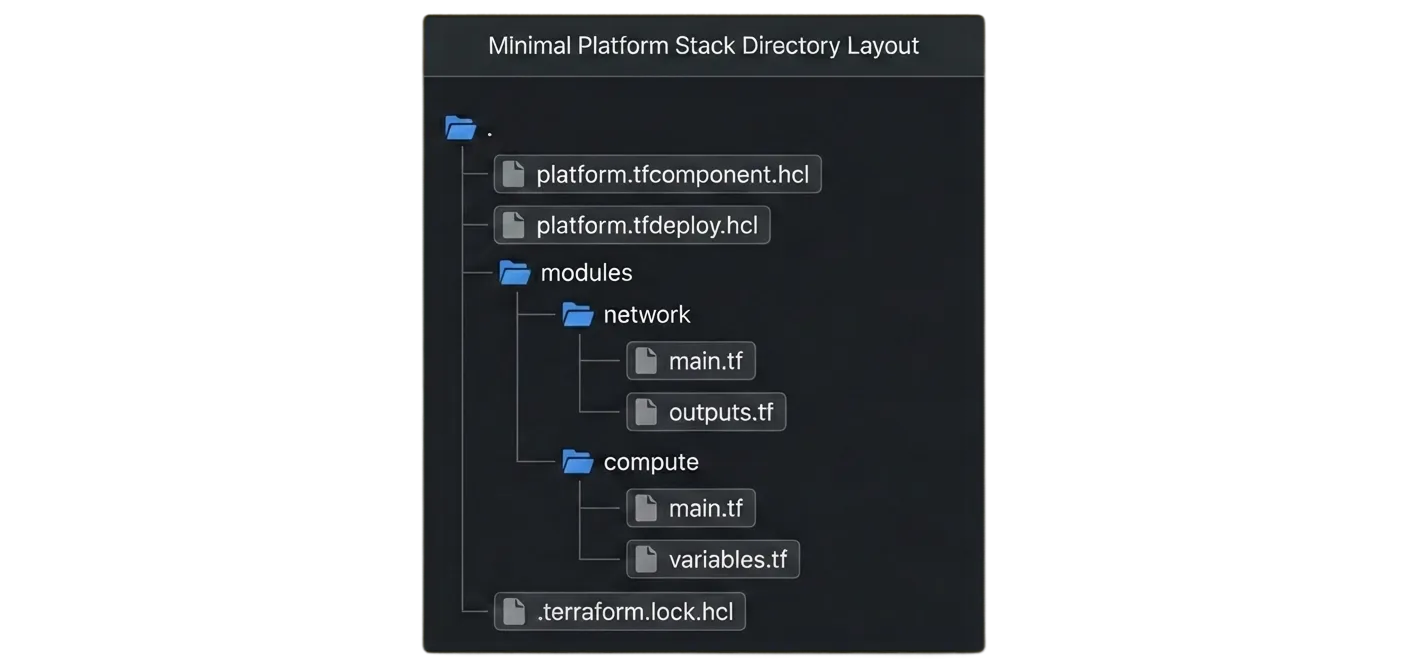
A component configuration file defines one or more components. The dependency wiring happens through component references, so compute can consume an output from the network component.
# platform.tfcomponent.hcl

variable "environment" {
  type = string
}

variable "cidr_block" {
  type = string
}

variable "instance_count" {
  type = number
}

component "network" {
  source = "./modules/network"

  inputs = {
    environment = var.environment
    cidr_block  = var.cidr_block
  }
}

component "compute" {
  source = "./modules/compute"

  inputs = {
    environment     = var.environment
    instance_count  = var.instance_count
    vpc_id          = component.network.vpc_id
    private_subnets = component.network.private_subnet_ids
  }
}
That component.network.vpc_id style reference is the core trick. It keeps your Terraform module boundaries intact, but it removes the need to hand-roll output passing between separate configurations.
Then your deployment configuration file repeats the same stack configuration across multiple deployments.
# platform.tfdeploy.hcl

deployment "dev" {
  inputs = {
    environment    = "dev"
    cidr_block     = "10.10.0.0/16"
    instance_count = 1
  }
}

deployment "staging" {
  inputs = {
    environment    = "staging"
    cidr_block     = "10.20.0.0/16"
    instance_count = 2
  }
}

deployment "prod" {
  inputs = {
    environment    = "prod"
    cidr_block     = "10.30.0.0/16"
    instance_count = 4
  }
}
Each deployment runs separately and has its own state file, which is why you can roll out to the development deployment first, then promote the same change to production deployments when you are happy.
If you copy an older Terraform stack configuration, you will often see .tfstack.hcl and orchestrate blocks. In GA, component configuration uses .tfcomponent.hcl, and orchestration changed so auto_approve, orchestrate, and replan blocks are deprecated in favor of newer deployment group and auto-approval syntax.
Deployment groups and automation live in the configuration
Deployment groups are how you apply shared settings and rules across deployments. Auto-approval is one common use case, especially when you want low-risk changes to flow without a human click.
In GA, the old orchestrate style is deprecated, and auto-approval is expressed through deployment group configuration using an auto_approve_checks argument.
Here is a concise pattern that auto-approves when a plan has no destroys.
# platform.tfdeploy.hcl

deployment_auto_approve "no_destroys" {
  check {
    condition = context.plan.changes.remove == 0
    reason    = "Plan would destroy resources."
  }
}

deployment_group "prod_rollout" {
  deployments = [deployment.prod]

  auto_approve_checks = [
    deployment_auto_approve.no_destroys
  ]
}
This isn't a replacement for policy, and it's not magic. It's a way to keep automation rules version-controlled next to your stack configuration files, so the behavior is reviewable in the same pull request as the infrastructure change.
How to use deferred changes
Some workflows need more than one plan and apply cycle because resources cannot be fully planned until an upstream resource exists. Think cluster creation, then Kubernetes resources that require the cluster to exist, then rollout across multiple deployments.
Stacks have a built-in concept for this called deferred changes. HCP Terraform can recognize dependencies between components and defer a component's plan and apply steps until it can complete them successfully, rather than forcing you to script the ordering yourself.
Linked stacks make upstream stacks explicit
Teams usually end up with multiple stacks once boundaries become clear. A platform stack might own networking infrastructure and identity, and app stacks consume those outputs.
Linked stacks are the data flow mechanism for that. One stack can publish outputs, another stack can consume them as upstream inputs, and when upstream outputs change, HCP Terraform can automatically trigger downstream runs.
This is where architecture sanity checks matter. Stacks currently have documented linking limits, including caps on how many upstream stacks you can link and how many downstream stacks can consume outputs. If you are planning a big platform split, check those constraints early.
Limits and gotchas show up faster than you expect
Stacks are powerful, but there are practical constraints you should design around.
HCP Terraform documents a maximum of 20 deployments per stack. It also documents up to 100 components and up to 10,000 resources per stack, while noting that deployment groups currently support only one deployment per group. It calls these constraints part of the current limitations.
Stacks and workspaces share concurrency, so stack deployment rollout planning should account for your existing plan and apply load.
Stacks are also not available on legacy HCP Terraform team plans, so confirm plan eligibility before you standardize on this model.
If you are migrating from beta-era stacks, treat it like a planned cutover. HashiCorp explicitly calls out backward-incompatible language changes in the GA update notes, including orchestration changes.
The Terraform stacks CLI and the provider lock file matter
If you are used to normal Terraform configuration workflows, you probably think in terms of terraform init, initializing provider plugins, and a dependency lock file. Stacks have a similar concept, but you do it through terraform stacks commands.
The terraform stacks providers-lock command creates or updates .terraform.lock.hcl for the current component configuration, recording provider versions and checksums so provider plugins stay consistent across environments and team members, including the Linux platform used in HCP Terraform runs.
The stacks command set also includes init, validate, create, and list, which are useful when you want to validate stack configuration locally before you push to your VCS repository.
Terraform stackset usually means CloudFormation StackSets
Search intent gets messy here. Many people who type "terraform stackset" may mean just Terraform stacks, but could also mean AWS CloudFormation StackSets.
CloudFormation StackSets let you create, update, or delete stacks across multiple accounts and AWS Regions from a single CloudFormation template. Each stack is based on the same template, with per-target customization through parameters.
Terraform can manage that AWS feature using resources like aws_cloudformation_stack_set and aws_cloudformation_stack_set_instance.
Terraform stacks are different. They are a HashiCorp model for orchestrating Terraform-managed infrastructure across multiple deployments, not an AWS StackSet capability. If your goal is a multi-account AWS CloudFormation rollout, StackSets are the right primitive. If your goal is Terraform-managed multi-environment orchestration with shared components, evaluate Terraform stacks in HCP Terraform.
Read our AWS CDK vs Terraform comparison for more information.
Stacks fit best when environments are the same shape
Stacks are compelling when you want repeated, coordinated rollouts of the same topology.
They are less compelling when every environment is bespoke, when teams want totally independent lifecycles, or when the organizational cost of shared rollout coordination is higher than the benefit.
A good compromise is common. Use stacks for shared platform building blocks, where consistency matters, and keep workspaces for one-off systems where the lifecycle is intentionally independent.
How Stategraph fits
Terraform stacks define a useful unit of infrastructure and lifecycle. Teams still need a workflow around changes, reviews, approvals, and audit trails, and many teams want that workflow anchored in Git rather than centered in a single platform UI.
Stategraph Orchestration is a GitOps control plane around Terraform workflows. It integrates Terraform operations directly into GitHub pull request workflows so teams can plan, review, and apply changes through comments, with automation driven by PR events.
Terrateam Stacks is one way to operationalize stack-shaped infrastructure changes across repos and environments while keeping the unit of change reviewable.
Conclusion
Terraform stacks are about removing the coordination overhead that shows up once you manage the same infrastructure across multiple environments. If your team is already modularizing into a Terraform module per infrastructure component, stacks give you a way to repeat that stack configuration across deployments with isolated state, coordinated rollouts, and less pipeline glue.
If you want the review, audit, and automation layer to live in pull requests, Stategraph Orchestration can help you run plan and apply in a policy-friendly GitOps workflow while you scale infrastructure changes across environments.