Best Practices for Terraform Security: The In-Depth Guide
Terraform security has become synonymous with running a scanner and locking down a remote backend, as if the hard part were catching a public security group before it merges. The hard part is what happens after: a plan diff nobody can meaningfully review at scale, and a state lock that serializes unrelated changes instead of authorizing them.
If you're reading this, you're probably not wiring up your first Terraform provider this week. You already run Terraform in production, and you've likely got a scanner wired into CI. You don't need infrastructure as code or a security group explained to you. If that is the case, this guide to Terraform security is for you: the practices that actually hold up at scale, not a beginner's checklist.
We cover Terraform state – what it exposes, how locking actually works, and what it doesn't protect against– and how you can keep secrets out of your Terraform code without pretending a sensitive flag does more than it does.
You also get a direct answer to the security group question that keeps surfacing in search: how to create one in AWS and attach it to an EC2 instance without the drift traps inline rules create.
We also identify where the standard toolkit (state locking and a plan you read line by line) stops being enough once dozens of state files and a dozen engineers are shipping changes in the same week, and what a graph-aware execution model changes about that ceiling.
The surface area Terraform security actually covers
Terraform security spans four areas where there is a risk. Treating any one of them as the whole picture is how a team ends up with a clean scanner report and a bad week anyway.
- The configuration: misconfigured resources, overpermissive IAM policies, and security groups more permissive than anyone intended.
- The state file, which holds a record of every resource attribute Terraform has ever touched, sensitive values included, regardless of how careful the configuration was.
- The execution path: what a
terraform planorterraform applycommand can actually touch, who's allowed to trigger it, and what credentials it runs with. - And everything you didn't write yourself: third-party modules, providers, and whatever a public registry happens to be serving that day.
Securing Terraform state files
Every production Terraform setup should run against a remote backend like S3, GCS, or Azure Blob Storage rather than a local .tfstate file on someone's laptop. That's less a security best practice than a baseline requirement: local state has no locking, no access control beyond filesystem permissions, and is one accidental deletion away from rebuilding your source of truth with terraform import.
Once state is remote, encrypt it at rest and restrict who can read the bucket or container it lives in. Most teams underestimate how much this covers: state files hold sensitive values whether or not your code ever hard-coded a secret, including resource IDs and IP addresses, plus, depending on the provider, plaintext credentials an API happened to return that Terraform then dutifully wrote to disk.
A security group's rules, a database's connection details, an access key generated inline: access to state is functionally access to all of it.
State locking belongs here too. It stops two concurrent terraform apply runs from corrupting the same state file by writing over each other, and that is all it does. A lock isn't a review gate; a mistake this article comes back to later.
Round this out with what gets skipped under deadline pressure: least-privilege access to the backend itself and versioning for a recovery path. State paths organized by environment count too, so a staging change can't touch production by accident.
Get these Terraform security best practices right, and you've covered the fundamentals. Where teams get into real trouble is everything that follows.
Keeping secrets out of Terraform code
A hard-coded secret in a .tf file is the easiest Terraform security mistake to make and, at this point, the easiest to catch: any static scanner flags an inline API key or database password on sight.
The harder discipline is consistency. Pull credentials from AWS Secrets Manager, Vault, or your cloud provider's equivalent, resolved through data source lookups rather than variables defaulting to values in a .tfvars file someone eventually commits.
The same logic applies to a pipeline's own credentials: inject them as environment variables from your CI platform's secret store, never as plaintext in the pipeline definition.
Marking an output sensitive = true is worth doing, and worth being honest about. It suppresses the value from CLI and console output. It doesn't encrypt the value, doesn't stop it being read during plan or apply, and doesn't guarantee it's absent from remote state once written there.
Terraform's remote state reads, notably, pull the full snapshot rather than the single field a consumer actually references, so a sensitive output sitting in a producer state can end up transmitted to a consumer that never asked for it. Treat sensitive as a display control, not a security boundary.
Rotate credentials on a schedule, not only after an incident. A secret sitting unrotated in Secrets Manager for two years is a hard-coded secret with extra steps; the point of external secret management is the rotation it enables, not just that the value isn't in Git.
How to scan Terraform for security flaws
Static analysis is the first automated layer, and Checkov and Trivy do roughly the same job. Both read your .tf files, or a generated plan in JSON (more accurate, since it reflects resolved variable values), and flag violations against a library of rules. If you're still running tfsec, its entire rule set moved into Trivy and the original tool is deprecated, so treat any migration as overdue and part of your security requirements.
Run well, that catches what everyone already knows to look for: open security groups, overpermissive IAM with wildcard actions, missing encryption, and providers pinned to nothing in particular.
Wire the scanner into CI so it runs on every pull request rather than depending on someone remembering to run it locally. Start in soft-fail mode, reporting findings without blocking, while the team clears the existing backlog, then flip it to a hard gate. Layer policy-as-code enforcement, Checkov or Open Policy Agent evaluating plan JSON against custom rules, above ad hoc scanning once you have organization-specific requirements a generic ruleset won't cover.
Here's the limitation every ranking guide glosses over: a static scanner evaluates a resource against a rule in isolation. It has no concept of what else in your dependency graph relies on that resource, what happens once infrastructure starts drifting after apply, or what a role's effective permissions become after chaining through a few assume_role hops.
A clean scan tells you the code doesn't violate a known rule. It doesn't tell you what's actually downstream if that resource changes, which counts for more once a state file has any real size.
How to create and attach a security group to an EC2 instance in Terraform
Creating a security group in AWS with Terraform
Skip the ingress/egress blocks on aws_security_group for anything you'll touch again.
The AWS provider flags the inline pattern as a source of drift and rule conflicts, and the current idiomatic approach is separate aws_vpc_security_group_ingress_rule and aws_vpc_security_group_egress_rule resources, one CIDR (or referenced security group) per rule:
Notice the ingress rule references another security group's ID (referenced_security_group_id) rather than a CIDR block. That's least-privilege scoping in practice: traffic is only allowed from resources wearing the load balancer's security group, not a subnet range that happens to include it.
Reach for 0.0.0.0/0 only where you genuinely mean the entire internet, and treat every other use as a finding your scanner should catch. Splitting rules into their own resources also gives each one its own lifecycle, so a plan diff shows exactly which rule changed instead of an opaque list replacing itself wholesale.
Attaching the security group to an EC2 instance
Attach it by ID, not by name, with vpc_security_group_ids on aws_instance:
Referencing by ID means Terraform tracks the dependency correctly and replaces the association cleanly if the security group is ever recreated, which a name change forces.
The older security_groups argument on aws_instance takes group names and only works in the default VPC (its original home, EC2-Classic, was retired in 2023). Changing vpc_security_group_ids on an existing instance updates the association in place; Terraform doesn't need to replace the instance to do it.
Least privilege access and separating permissions for Terraform runs
Scope the IAM role behind your Terraform runs to the specific resources that each run actually needs, not a broad administrator policy reused across every pipeline because it was easier to set up once.
A pipeline that only touches networking and compute in one account doesn't need write access to billing or IAM policies in another.
Separate permissions by environment as deliberately as you separate state. Production and staging should use different credentials, scoped to different accounts or resource boundaries, so a compromised staging pipeline can't reach production regardless of what its Terraform code says. The same logic applies across regions if your compliance boundaries are drawn that way.
Avoid long-lived API keys sitting in a CI secret store indefinitely. Federated, short-lived credentials (OIDC-based role assumption for GitHub Actions or GitLab CI) mean a leaked credential expires on its own instead of staying valid until someone remembers to rotate it. The value is in scoping the specific roles your pipelines use today, not in the general principle.
Code review and version control for Terraform configuration
Standard hygiene applies here the same way it does to application code: everything lives in a version control system, and resource and module names are meaningful rather than placeholders.
Changes land through pull requests rather than a direct push to a branch that triggers apply, and branch protection on the repository that manages production infrastructure should require a passing plan and a review, with force-pushes disabled.
Pull requests are genuinely where a security-relevant change gets caught before it reaches production, assuming the reviewer can reason about what they're looking at.
That assumption is worth pressure-testing. A reviewer approving a forty-resource plan is reading HCL text and a list of diffs, trusting that nothing buried in the noise is load-bearing. A plan diff has no native way to show what's actually downstream of the resource being changed, so that trust is largely assumed.
That's a property of the artifact they're handed, not a knock on any reviewer's diligence.
Wiring a scanner and a policy check into that same Terraform CI/CD pipeline closes part of the gap, but it doesn't change what a human reviewer is actually looking at when they approve the plan.
Detecting and correcting configuration drift
Configuration drift, infrastructure changing outside your Terraform pipeline, is a security challenge before it's an accuracy issue.
A security group opened during an incident and never reverted, an IAM policy widened by hand to unblock someone in a hurry, a manual console change nobody wrote back into code: none of these show up as a code review finding.
There was no code involved to review in the first place. They surface as a terraform plan diff the next time someone runs one, if anyone does before an audit or an attacker finds it first.
Run drift detection on a schedule independent of your deploy cadence. A terraform plan on a timer, alerting on any non-empty diff, is a reasonable baseline. Treat every detected drift as requiring a decision and a fix, not a log entry to acknowledge and move past. Adopting a manual change means updating the code to match reality; rejecting it means applying to revert it. Deciding to deal with it later is how drift compounds.
Continuous auditing after terraform apply completes closes the loop that scanning alone can't: a scan checks code at merge time, drift detection checks whether reality still matches that code months later.
Pinning and vetting third-party modules
An unpinned module pulled from the public Terraform Registry or a random GitHub repository is code you didn't write and don't control, running with whatever permissions your pipeline has.
Pin module versions explicitly, review a module's source before adopting it for anything touching production, and prefer an internal, vetted registry for infrastructure that carries real risk.
Where state locking and plan review stop being enough
Three limits, all touched on earlier, are worth stating plainly and together: nothing covered so far solves them, and each gets worse as a team scales rather than better.
State locking is a concurrency control, not an authorization control. It stops two applies from corrupting the same state file; it says nothing about whether either change was allowed to happen, and it locks the entire state regardless of whether two engineers are touching the same resource or two unrelated ones. A security group update and an unrelated IAM policy rotation in the same state still queue behind each other.
A plan diff doesn't show a reviewer the actual blast radius of a change once a state has any real size. Forty lines of HCL diff and what's actually downstream are different questions, and only the first is what a standard review artifact clarifies.
A security-relevant change spanning more than one state file (a security group in a networking state, an EC2 instance or IAM role referencing it in another) has no atomic path through standard Terraform. If the second apply lags or fails, the environment sits transiently inconsistent, sometimes under-permissioned, until someone notices.
None of this is a fringe complaint. In Firefly's State of IaC 2026 report, 90% of infrastructure professionals said their IaC orchestration falls short, and the gap widens with scale: only a small percentage report no notable IaC scaling issues at all.
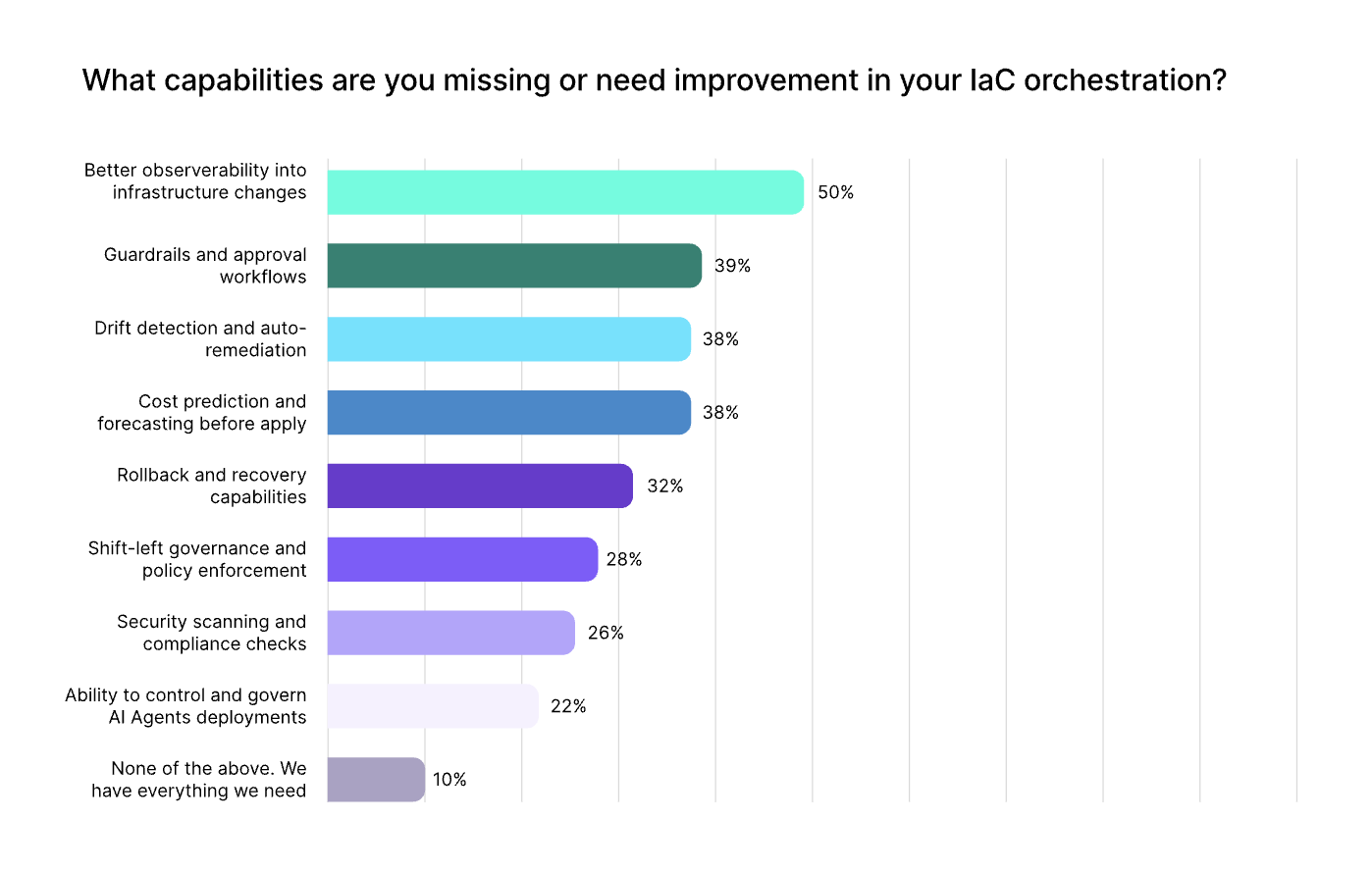
These conditions are exactly what show up once a team runs many state files with many concurrent changes.
Graph-aware execution: a different security model for Terraform
Stategraph takes a different approach: it stores your infrastructure's dependency graph in a database and operates only on the subgraph a change actually touches, instead of treating the whole state as one indivisible unit on every plan and apply.
It changes what a security review artifact can be, though it doesn't replace policy enforcement or a human decision; it makes the manual review step in front of that decision legible instead of a guess dressed up as due diligence.
Resource-level locking, built on the same stored graph, locks only the resources a change actually affects. Two engineers touching unrelated resources in the same state stop queuing behind each other, and the state-splitting workaround teams reach for to dodge lock contention (which just multiplies the backends and IAM policies to secure) stops being necessary.
Cross-state transactions close the partial-apply gap directly: a security group change in one state and the EC2 instance or IAM role referencing it in another apply as a single atomic unit, so there's no window where the environment sits half-configured.
For teams that have already split state to cope with lock contention (and most enterprise Terraform users have), this is a direct fix for a gap specific to exactly that situation.
None of this replaces the fundamentals covered earlier. Scoped IAM roles, secret management, and static scanning still matter regardless of how state is stored. Graph-aware execution is additive for teams who've outgrown what whole-state locking and manual plan review can support, not a substitute for having those fundamentals in place first.
Conclusion
Terraform security, done properly, starts with the fundamentals: state stored remotely and encrypted, secrets pulled from a real secret manager instead of hard-coded into .tf files, static scanning wired into every pull request, IAM roles scoped to what a run actually needs, and drift treated as something to detect and correct on a schedule rather than discover during an audit.
Layered on top of that, there's a concrete fix for the most common security group mistake. Create the group with dedicated ingress and egress rule resources, then attach it by ID. Least-privilege scoping does the work a wide-open CIDR block can't undo after the fact.
Where enterprise teams hit a ceiling is everything the standard toolkit doesn't cover: authorization versus concurrency, blast radius versus plan diff, atomicity across state boundaries. Try Stategraph free to see what a graph-aware execution model changes about all three.
Terraform security FAQs
How do you scan Terraform for security flaws?
Wire a static analysis tool like Checkov, tfsec, or Terrascan into CI so every pull request gets scanned automatically against a library of built-in rules covering open security groups, overpermissive IAM, missing encryption, and providers pinned to nothing in particular.
Run the scan against a generated plan file rather than raw configuration when you need it to reflect resolved variable values, and layer policy-as-code enforcement above it once you have organization-specific rules a generic scanner won't cover. Remember that a clean scan only evaluates code at the moment it was written, not what happens to the infrastructure afterward.
How do you attach a security group to an EC2 instance in Terraform?
Set vpc_security_group_ids on the aws_instance resource to a list containing the security group's ID, not its name. Referencing by ID keeps the dependency graph accurate and lets Terraform update the association cleanly if the security group is ever replaced, and it works for both new instances and adding a security group to one that already exists.
How do you create a security group in AWS using Terraform?
Define the group with aws_security_group for the name, description, and VPC association, then manage its rules with separate aws_vpc_security_group_ingress_rule and aws_vpc_security_group_egress_rule resources rather than the inline ingress/egress blocks.
Scope ingress to a referenced security group ID or a specific CIDR wherever possible, and reserve 0.0.0.0/0 for cases where open access is genuinely the intent.
Does marking a Terraform output or variable as sensitive actually secure it?
No. It suppresses the value from CLI and console output, which is a real and useful thing to do, but it doesn't encrypt the value, doesn't stop it from being read during plan or apply, and doesn't guarantee it's absent from the state file. Treat sensitive as a display control for the people running Terraform, not a security boundary for the data itself.
How much risk do third-party Terraform modules actually introduce?
Real supply-chain risk, particularly from unpinned modules pulled from the public Terraform Registry or a random GitHub repository.
Pin module versions explicitly, and review a module's source before adopting it for anything touching production. For infrastructure that carries real risk, opt for an internal, vetted module registry over pulling straight from the public one. An unpinned module is effectively code you didn't write and don't control, running with whatever permissions your pipeline has.