Terragrunt run-all: A guide for Terraform teams at scale
terragrunt run-all is what Terraform teams reach for when the estate stops fitting in one directory, and the fact that it works so well is exactly why its limits are worth understanding.
Every Terraform estate starts with a directory that feels small enough to understand. Managing infrastructure becomes more challenging once networking splits from compute, databases get their own state, shared services move into another account, and environments multiply.
You'll soon be hopping through folders with a sequence of terraform plan and terraform apply commands.
A database module that expects subnet IDs from a VPC cannot safely run before the VPC exists. An EC2 module that needs security group outputs cannot be applied while those groups are still being created.
A new environment might look like a clean project structure from a distance, but close up, it's a chain of assumptions about which module has already run, which remote state output is readable, and which apply operations are still safe to execute. terragrunt run-all became popular because it gives teams a way to stop treating execution order as tribal memory.
What is terragrunt run-all?
The prefix wrapper terragrunt run-all enables you to run one Terraform command across many Terragrunt units from a root directory, where each unit is a folder containing a terragrunt.hcl file.
The preferred form is terragrunt run --all <command>, as the newer run command now takes on the responsibilities of the deprecated run-all command. It still functions the same for engineers searching for terragrunt run-all documentation and trying to make sense of existing scripts:
Or, in older syntax.
Terragrunt discovers the relevant HCL files under the working directory, parses the dependencies configured between those units, builds a directed acyclic graph, and then runs the requested Terraform command in the correct order.
The old apply-all, plan-all, and destroy-all family was already replaced by run-all, and current Terragrunt is now pushing users one step further toward run --all, meaning the version you standardise on matches the Terragrunt version enabled in your CI/CD runners.
How the dependency graph works
Importantly, terragrunt run-all builds a dependency graph from your Terragrunt configuration, using that graph to decide which modules can run immediately, which modules must wait, and which modules can be skipped or run in parallel because they don't share an upstream dependency.
This directed acyclic graph, or DAG, is built from dependency and dependencies blocks, then used to order plan, apply, and destroy differently depending on the command.
A dependency block declares an upstream unit and reads its outputs, which is what you use when one module needs values from another module's state.
A dependencies block declares ordering without reading outputs, which is useful when the relationship is operational rather than data-shaped.
Picture a simple stack. The VPC has no upstream dependency, the security groups depend on the VPC, and EC2 depends on both the VPC and the security groups. A plan or apply starts at the root of that dependency chain, so the VPC runs first, then the security groups, then EC2. If there is a separate DNS module with no shared dependency, Terragrunt can run it alongside the VPC because the graph says those operations are independent.
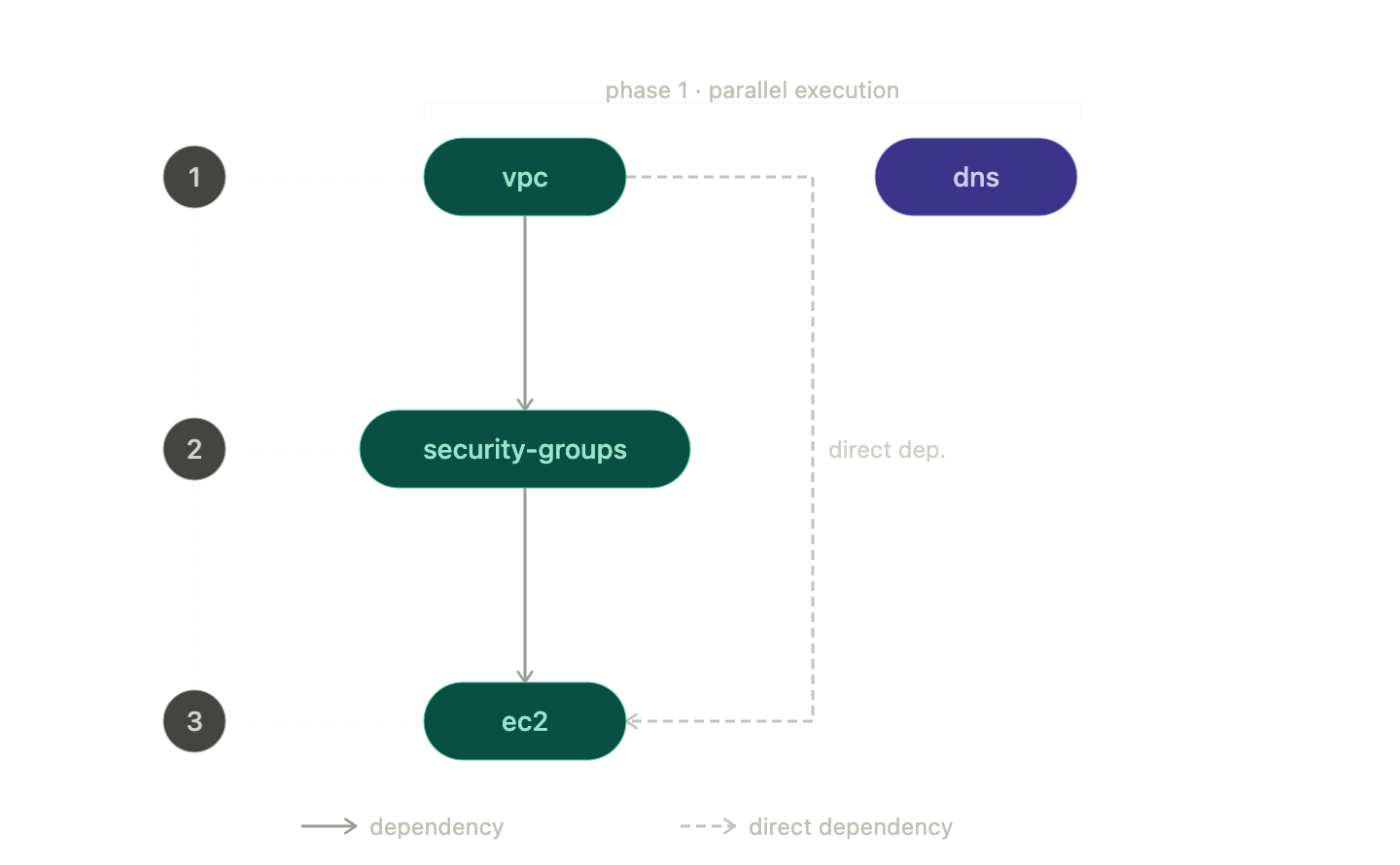
That graph is the difference between a powerful command and a dangerous shell loop.
Terragrunt isn't guessing based on folder names, and it isn't trusting the order in which a user happened to type commands; it's deriving execution order from the relationships your configuration declares, meaning the quality of those dependency and dependencies blocks determines how safe run-all really is.
Once that graph exists, plan, apply, and destroy are no longer just different Terraform commands, because each one puts different pressure on the same ordering model.
Plan, apply, and destroy each stress the graph differently
terragrunt run-all plan is usually the safest place to start, because it traverses the full graph and produces a plan for every module without changing resources. In CI, a single pull request can affect multiple Terraform modules, shared inputs, generated backend configuration, or a common environment file, and a one-module plan will miss the second-order effects.
Terragrunt supports --out-dir for stack runs, which stores native plan files per unit and can later be consumed by apply, replacing the older --terragrunt-out-dir spelling from pre-redesign CLI usage.
terragrunt run-all apply, or more precisely, terragrunt run --all apply in the current CLI, executes apply operations in dependency order and uses parallel execution where the dependency graph allows it.
Parallelism becomes a consideration here because the fastest possible run is not always the safest or most reliable run, especially when providers, cloud APIs, rate limits, or shared backend operations become the real constraint. In Terragrunt, --parallelism is the cap on concurrent operations for --all runs, with the older --terragrunt-parallelism spelling mapped to the newer flag.
There is one automation detail worth correcting because older examples often get it wrong. Current Terragrunt automatically appends -auto-approve for run --all with apply or destroy, due to shared stdin limitations, and exposes --no-auto-approve when you want to prevent that behaviour.
Older pipelines and older blog posts may still show explicit Terraform -auto-approve handling, so check the version you are actually running before cargo-culting flags into CI/CD.
The terragrunt run-all destroy command is the one to treat with the most suspicion, because destroy reverses the dependency order. Leaf modules go first, then Terragrunt works back toward the roots, so dependent resources are removed before the infrastructure they depend on.
In the VPC, security group, and EC2 example, EC2 is destroyed before the security groups, and the security groups are destroyed before the VPC. Bear in mind that destroy orders dependents before dependencies, which is exactly what you want, but also exactly why a bad dependency graph can become expensive very quickly.
Those three commands are the core workflow, but real production usage usually turns on the flags that decide how much of the tree you are willing to touch.
Useful flags and options from the documentation
The flags worth memorising are the ones that let you express intent clearly when you do not want the default behaviour, because the default for run --all is to include all units in the current working directory:
--queue-include-dirand--queue-exclude-dir--queue-ignore-errors--parallelism--no-auto-approve--queue-include-units-reading
--queue-include-dir and --queue-exclude-dir (formerly --terragrunt-include-dir and --terragrunt-exclude-dir) are the flags to reach for when the root directory is larger than the change you want to make.
A platform team might plan only prod/** during a production deployment, exclude a legacy folder during a migration, or run one account while leaving the rest of the project untouched. Current Terragrunt treats these queue flags as aliases for the newer filter system, which is more expressive, but the intent remains familiar to anyone who has used directory-scoped run-all before.
--queue-ignore-errors (formerly --terragrunt-ignore-dependency-errors) is the flag that lets the run continue past failures. It has legitimate uses, especially during discovery, broad validation, or messy teardown work where you want a fuller picture of everything broken, but it's not a free resilience feature. It can leave you with a log full of downstream noise after the first real failure, and can make recovery harder if people mistake continued execution for safe execution. The CLI migration table maps the old name to the current one, which is useful when you are reading older CI scripts.
--parallelism is the pressure valve. Set it too low, and you turn graph execution into a polite queue. Set it too high, and your provider, backend, or runner becomes the bottleneck. The correct value depends less on how many modules you have and more on what those modules do.
After all, fifty small IAM plans behave very differently from fifty Kubernetes, RDS, and networking applies all competing for API limits.
--no-auto-approve (formerly --terragrunt-no-auto-approve) is useful in review gates where you want Terragrunt to avoid appending -auto-approve to destructive run --all commands. It's not a substitute for a proper approval workflow, but it is a useful check box when humans are intentionally sitting between plan and apply.
--queue-include-units-reading (formerly --terragrunt-queue-include-units-reading) is a newer flag that matters when a shared file changes. If a common _env/app.hcl file is read through include or an HCL function, then this flag can include units that read that file, even when those units were not directly changed in the branch, making it particularly useful for CI/CD pipelines that need to plan the real impact of a shared configuration edit.
These flags make run-all practical in real repositories, but they also reveal the failure modes that show up once the stack grows beyond a tidy demo.
Common pitfalls of the Terragrunt command
Partial failures
Every team eventually has its first partial failure. A run-all apply starts cleanly, the first group of modules succeeds, a middle module fails, and the estate is neither untouched nor fully applied.
Terragrunt doesn't corrupt anything by doing this; it executes independent units according to the graph, and one of those units fails. Recovery can still be manageable.
Lock contention
Each module has its own remote state and its own lock, which seems like isolation until a large graph in CI starts waiting on many locks in sequence or competing with other branches that happen to touch overlapping stacks.
Parallel execution helps when modules are genuinely independent, but it doesn't remove the underlying fact that each state file is still its own coordination boundary.
Output coupling
A dependency block that reads outputs from an upstream module is exactly what makes Terragrunt dependencies useful, but it also means module B's plan can fail because module A's state is unavailable, broken, locked, missing an expected output, or only half-created after a previous failed deployment.
In a clean environment, this feels natural. In a partially broken environment, it can turn one real problem into a cascade of plan errors that all look urgent.
Visibility
Parallel logs are noisy by default, and although Terragrunt gives you structure, the actual experience of reading interleaved output from many Terraform processes after a failure is harder than it should be.
You can usually reconstruct what happened, but reconstruct is the operative word. The run was dependency-aware, but the evidence you get back is still spread across modules, state files, terminal output, and CI job logs.
Observation
None of this makes terragrunt run-all a bad tool; it makes it an honest orchestration layer sitting on top of a state model that was never designed to be a shared, queryable control plane.
When orchestration isn't enough
terragrunt run-all is a well-designed answer to a real problem, and for teams managing multiple Terraform modules across accounts, environments, and long dependency chains, it's far better than a cd loop with institutional memory as the scheduler.
It gives you:
- A dependency graph
- A run queue
- Parallel execution
- Destroy ordering
- Directory filters
- Shared-file impact detection
- A practical way to manage infrastructure when one module at a time has stopped scaling
The pitfalls aren't bugs in the run-all command; they're symptoms of the substrate underneath it. Each module still has its own isolated state file. Each state file still has its own lock. Each plan still depends on reading outputs and refreshing state through boundaries that know less about the wider system than your architecture diagram does. Terragrunt coordinates those pieces well, but it's still coordinating pieces.
It's at that point that some teams realize the problem isn't that the orchestrator needs another flag; it's that infrastructure is a graph, while the state model is still a collection of flat files.
Design Principle
Stategraph was built to answer that question. Stategraph replaces the flat Terraform state file with a graph-aware backend, so plans and applies operate on the affected subgraph rather than forcing every workflow through full-state refreshes and coarse locks.
Multi-state changes can be coordinated natively rather than chained through wrapper logic, and the relationships between resources become part of the data model instead of something inferred over and over at runtime.
If Terragrunt is solving the pain of running the modules in the correct order, Stategraph is aimed at the deeper pain that made ordering, locking, partial recovery, and visibility so hard in the first place. Use Terragrunt if your repository needs structure and dependency-aware execution. Use Stategraph when the estate has grown to the point where orchestration is no longer the whole problem, because the state model itself has become the thing you are working around.
Get started with Stategraph today.